Quishing: Phishing Hidden in QR Codes
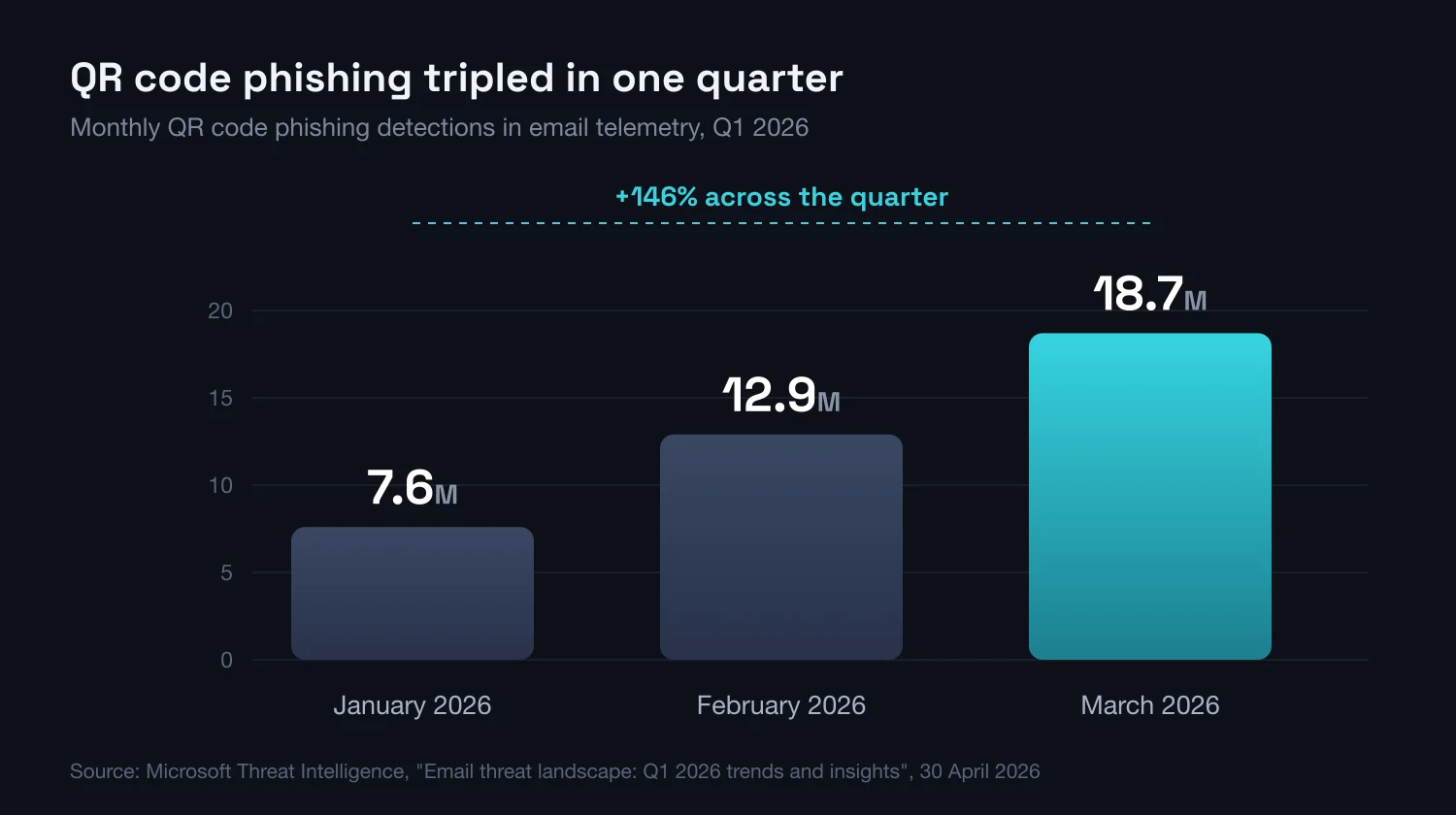
An email filter can inspect every link in a message. It cannot inspect a QR code, because it sees an image. That single gap carries the whole vector, whose detections climbed from 7.6 million in January 2026 to 18.7 million in March.
Quishing is phishing with the link encoded as a picture. The email filter analyses text and addresses, and this message carries none: it carries a PDF attachment, a square of black pixels and a person holding a phone. By March 2026 that pattern accounted for 18.7 million detections a month in Microsoft email telemetry, up from 7.6 million in January.
What is quishing?
Quishing, from "QR" and "phishing", is an attack where the malicious link is encoded as a QR code rather than an ordinary hyperlink. The victim scans it with a phone and lands on a fake login page. The code itself is not an attack technology: it is an address written in graphical form, the same as the one on a restaurant bill.
The deception looks the same as in other types of phishing. Only the wrapper around the link changes, and that is enough to bypass much of the email tooling companies have spent a decade buying. The filter is not broken. It never receives the input it was built to examine.
The term has reached the glossary of the EU agency ENISA, which defines quishing as QR code-based phishing that directs victims to malicious websites or payloads. Not a conference curiosity, then, but a named category in the European threat landscape.
How much of it there actually is
In the first quarter of 2026, QR code phishing was the fastest-growing email attack variant. Detections rose from 7.6 million in January through 12.9 million in February to 18.7 million in March, up 146% and the highest monthly figure in at least a year. The sample was roughly 8.3 billion email threats from the same period.
The same vector does not climb in a straight line in every dataset. In the fourth quarter of 2025, email attachments carried 655,673 unique malicious QR codes, down 9% from 716,306 the quarter before. The fall did not mean less risk: attackers rebuilt their infrastructure and changed targets, timing part of it to Black Friday week.
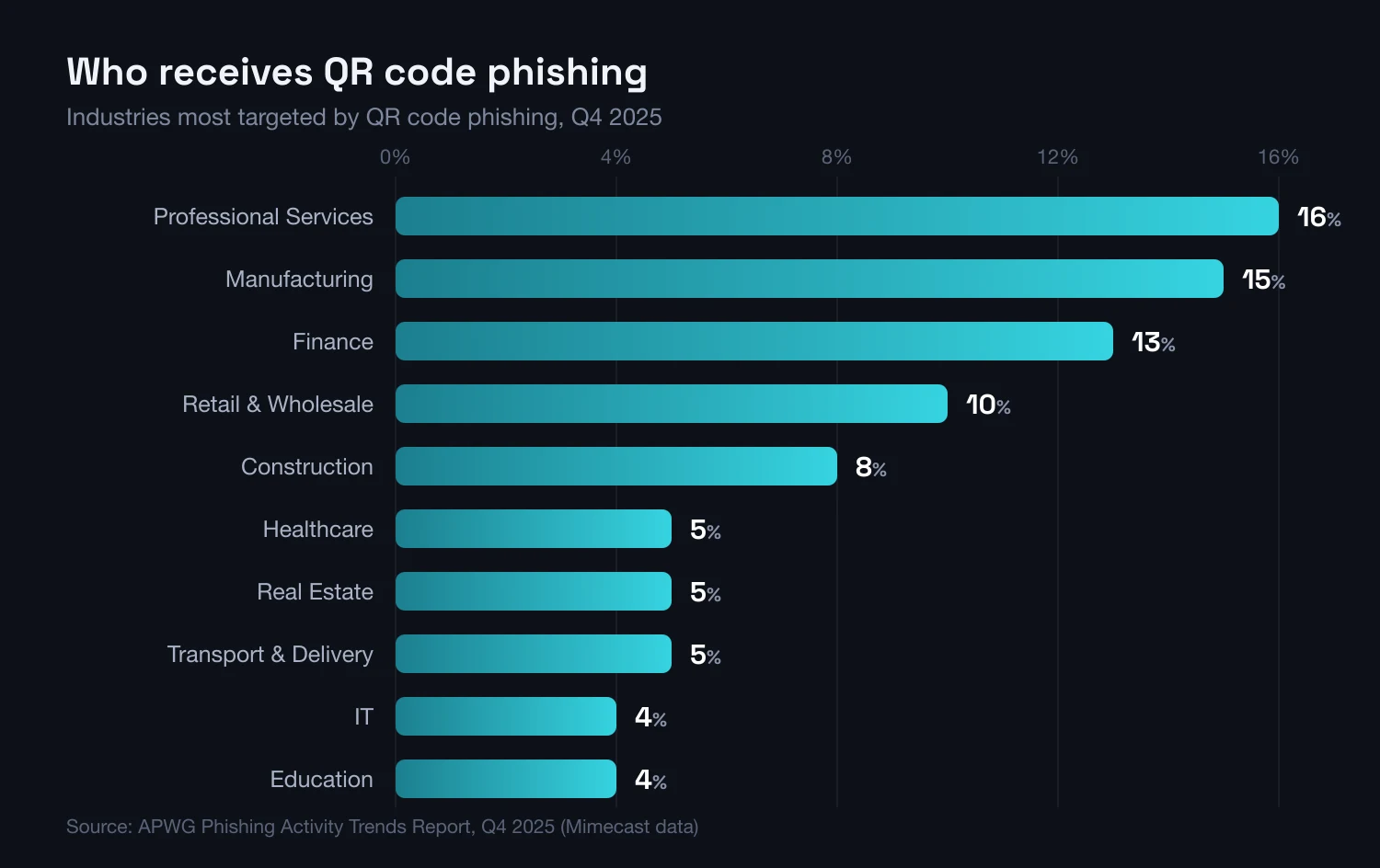
The split by industry says more than the headline number. No sector stood out far enough to call it one industry under fire, and that is informative: these campaigns run broadly rather than profiled to a vertical.
Impersonated brands rotate faster than sectors. In the fourth quarter of 2025 Walmart dominated (61%), followed by AstraZeneca (23%), which had not been attacked via QR code even once the previous quarter. DHL, the most-impersonated brand of Q2 2025, accounted for just 0.7% by then. The target list gets rebuilt from scratch.
The proportions matter. Analysing 4,875 incidents between July 2024 and June 2025, ENISA named phishing the dominant intrusion vector at 60% of cases, against 21.3% for vulnerability exploitation. In the United States, phishing and spoofing remained the most reported internet crime, with 191,561 complaints in 2025.
A separate pattern concerns leadership. Abnormal Security calculated that in the fourth quarter of 2023, C-suite members received 42 times more QR code attacks than the average employee, and 89.3% of those attacks went after credentials. That data is two years old, so treat it as a description of the mechanism. Target selection works as we describe under spear phishing and whaling.
Why the email gateway does not stop it
The gateway lets quishing through not out of negligence but because its strongest mechanisms need a URL, and this message has none. Four attacker decisions create that gap.
The code is an image, not text
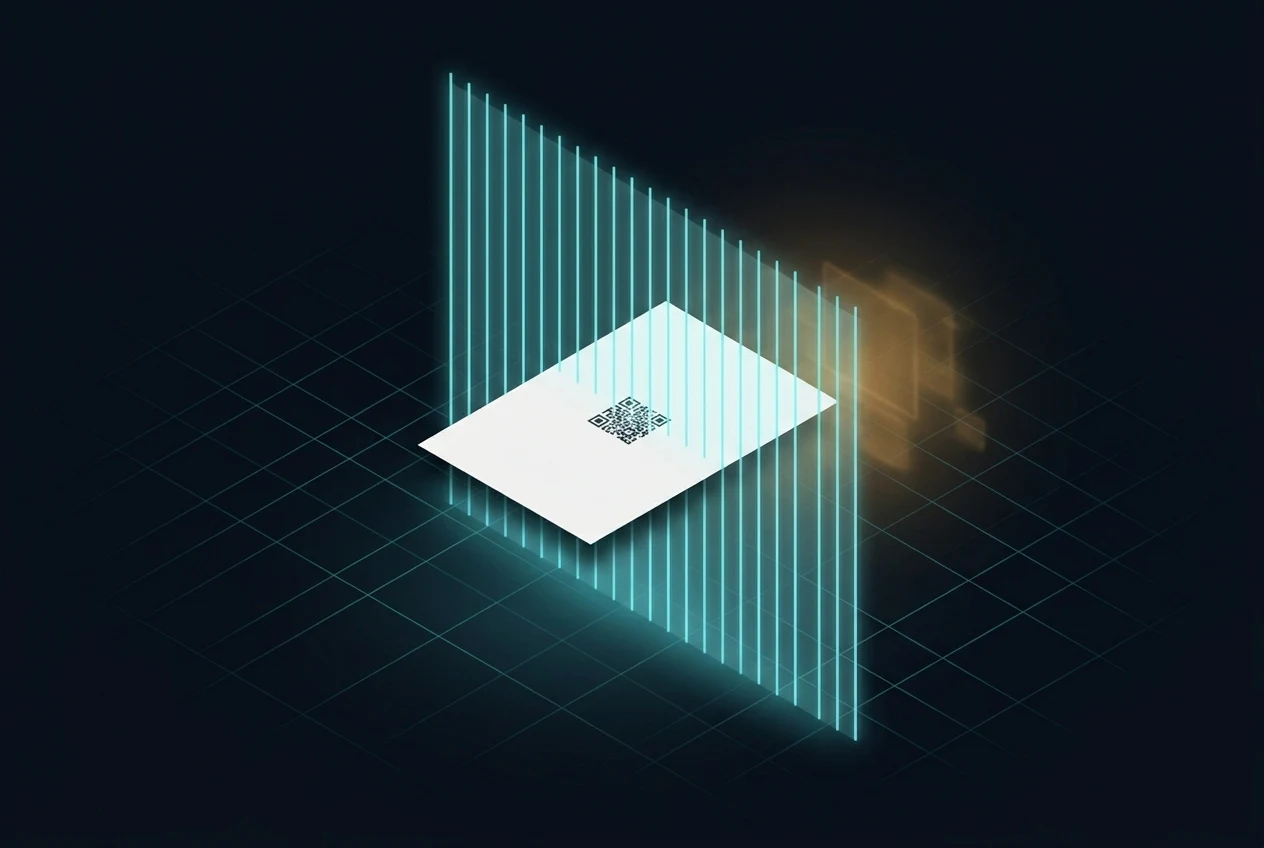
Domain reputation, blocklists, link rewriting and sandbox detonation all start by extracting an address from the content. A QR code is not an address but a picture of one, so a text analyser walks past it. To see the destination, the gateway must recognise a code inside the image and decode it: an extra step for every attachment, and the first place attackers break the chain. Codes get rotated, made noisy or split into fragments.
It usually travels in an attachment
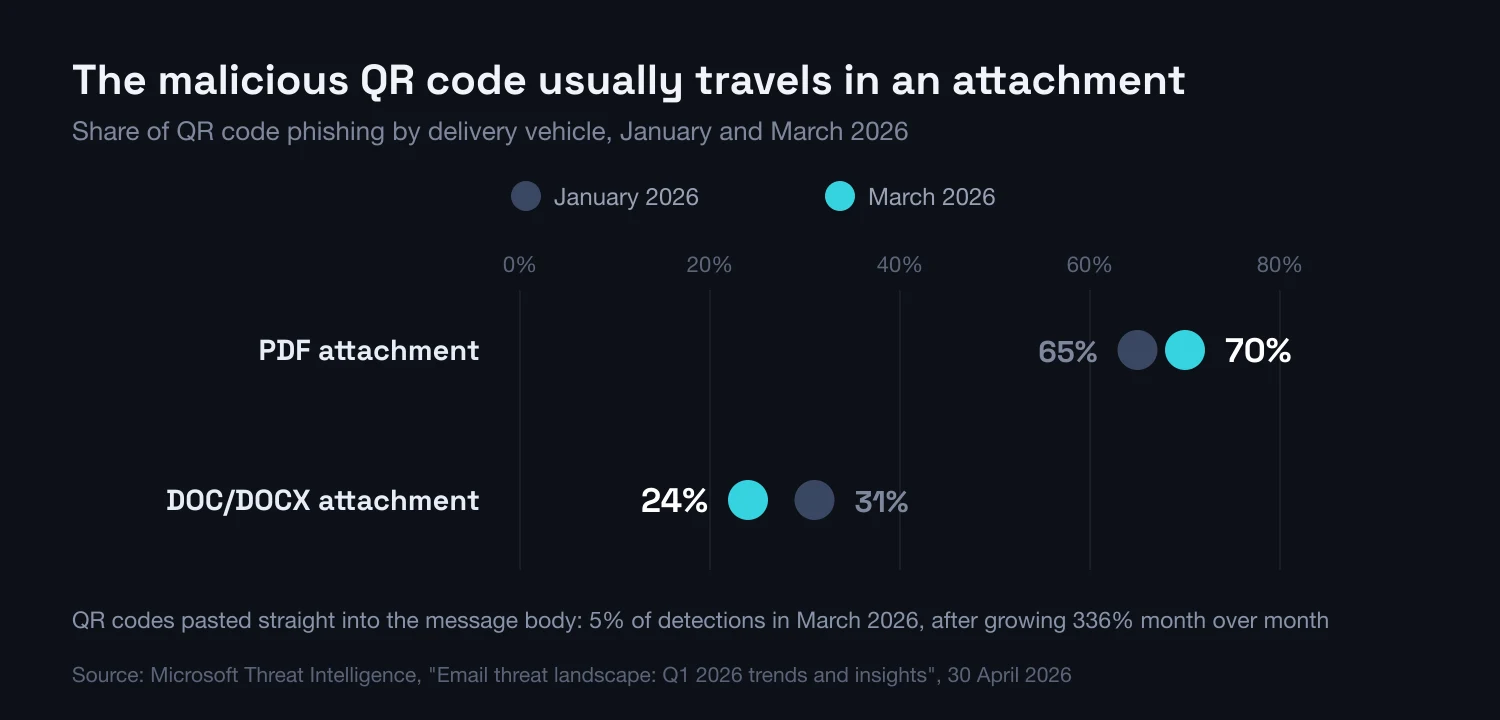
In March 2026, 70% of malicious QR codes arrived in a PDF attachment and 24% in a DOC or DOCX file. Codes pasted into the message body accounted for 5%, although that variant grew 336% month over month in March. The attachment suits the attacker: the document has to be rendered before the graphic is visible, and it can hide the real address inside PDF annotations.
The destination hides behind a redirect chain
The address in the code rarely leads straight to the credential-harvesting page. It usually points at a generator, which redirects to a shortener (most often TinyURL in Q4 2025), which lands on the login panel. Add CAPTCHA gates an automated crawler will not pass: March 2026 saw 11.9 million such attacks, up 125%. Every link can be repointed without touching the code that was sent.
The message looks like a process you already run
QR code campaigns imitate a document for signature, an HR update, an invoice or a delivery notice, where an attachment is the norm. ENISA documented the Scanception campaign, in which QR codes in PDF attachments sent victims to credential-harvesting pages hosted on trusted cloud platforms, including in the EU. Hosting on a reputable domain means the destination reputation raises no alarm either.
# QR code generator domains — APWG Phishing Activity Trends Report, Q4 2025
scan[.]page             61.1% of Q4 2025 detections
view[.]page             38.6%
qr.scanned[.]page       36.6%
qrfy[.]io               18.3%
jsj[.]top               415,345 detections (down 64% from Q3 2025)

# Dropped out of detections entirely between Q3 and Q4 2025
qrto[.]org   qr[.]pro   me-team[.]org   bio[.]link

# Redirect layer seen most often in Q4 2025
tinyurl[.]com

# Retrospective review of your own mail flow
1. inbound mail whose body is an image and contains no URL at all
2. PDF / DOCX attachments whose rendered pages hold a decodable QR code
3. decoded QR destinations resolving to a shortener or a code generator
4. sign-ins minutes later from a mobile user agent and an unfamiliar ASNWhy another filter will not fix this
The APWG data from the fourth quarter of 2025 shows how quickly this infrastructure moves. JSJ[.]TOP, the most prolific source in Q3 with 1,149,088 detections, produced 415,345 in Q4, down 64%. Four other generators, QRTO[.]ORG, QR[.]PRO, ME-TEAM[.]ORG and BIO[.]LINK, vanished from detections. New ones took their place: SCAN[.]PAGE alone accounted for 61.1%, ahead of VIEW[.]PAGE (38.6%) and QRFY[.]IO (18.3%).
The conclusion is uncomfortable for anyone relying on a domain blocklist. Blocking a generator buys roughly one quarter, then the list starts from zero. There is a further problem: those same generators carry legitimate traffic, because marketing agencies, museums and conference organisers use them. Blocking the domain hits that traffic too, which is why such blocks rarely last.
How the attack works
Creating the pretext
The attacker produces a message or a printed item with a credible reason to scan: account verification, an invoice, an HR record update.
Scanning the code
The victim scans with their phone. The message got through the filter because the body contained no link, only an image.
The fake page
The phone opens a page imitating a login portal. The address is shortened or masked, and a phone screen shows only its start anyway.
Account takeover
Entered credentials go to the attacker. Better kits capture the one-time code too and hijack the session, even with 2FA switched on.
Where malicious QR codes appear
Quishing does not stop at email, and the physical variant is the hardest: a sticker on a parking meter passes through no gateway and leaves no log. The table sorts the variants by what you can observe before scanning.
| Variant | Signal before scanning | Where it shows up |
|---|---|---|
| Code inside a PDF attachment | It tells you to reach for a phone although you are signed in on the computer | Corporate email: invoices, documents for signature, HR matters |
| Code in the message body | The code sits where a button normally would, and the message contains no link | Password-expiry and MFA notices |
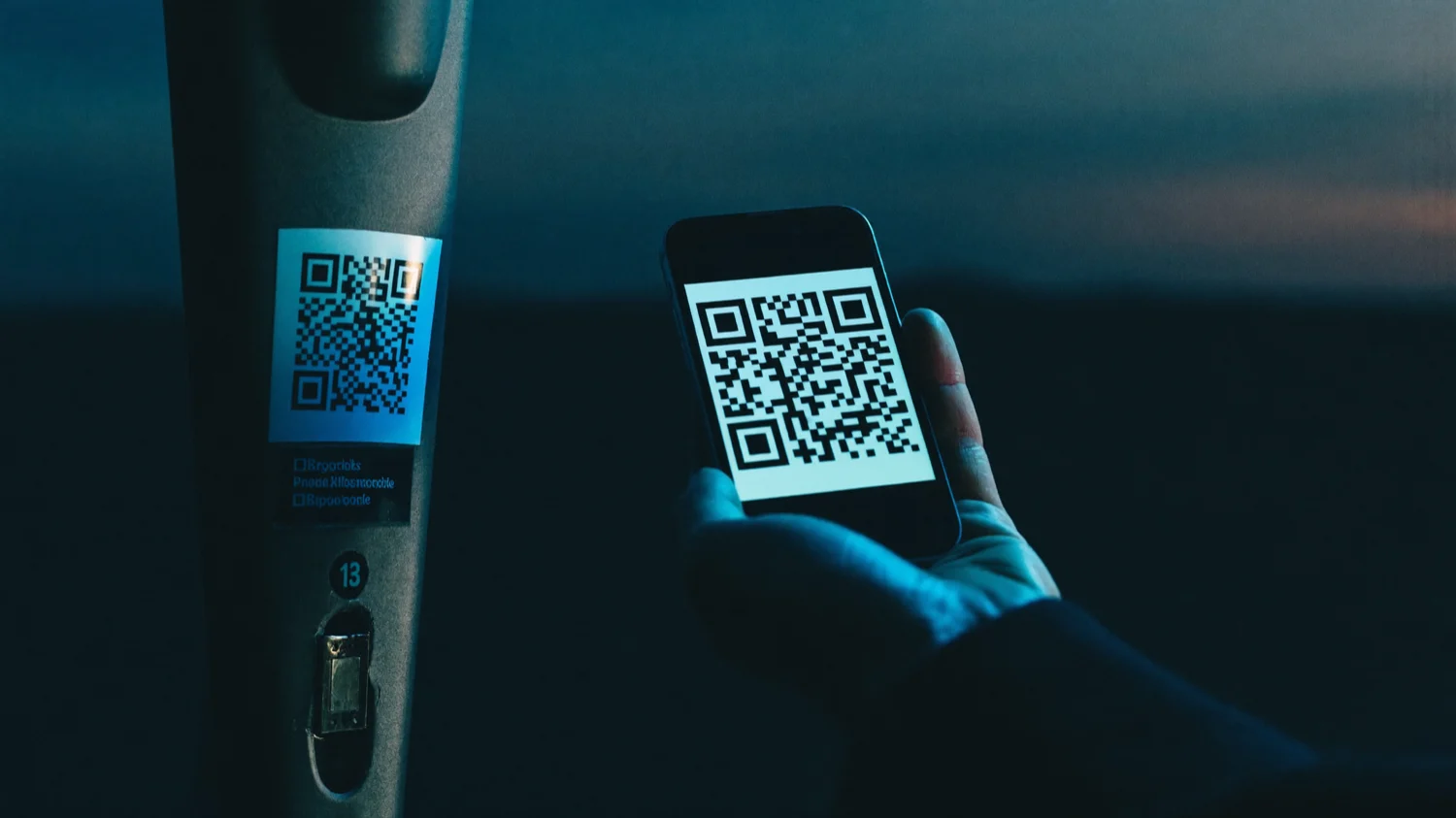
| Sticker on a parking meter | A sticker over the original marking: different finish, lifting edges, hidden zone number | Streets, municipal car parks, posts next to the machine |
| Fake payment demand under a windscreen wiper | A leaflet with an agency logo and a code for "quick payment"; agencies do not work this way | Car parks, streets, the area around the office |
| Code on an EV charger or self-service terminal | Payment starts from a code, not the operator app, and the page asks for card details outside any known system | Charging stations, ticket machines, public terminals |
| "WiFi code" in a hotel or cafe | An unbranded card leading to a login form instead of a network | Hotels, coworking, airports, meeting rooms |
| Delivery card or parcel notification | A code instead of a tracking number, and a status the carrier app does not confirm | Letterboxes, doors, email and SMS imitating couriers |
| Posters, roll-ups, conference materials | The code does not match the layout, or appeared without the organiser knowing | Conferences, receptions, office kitchens |
The leaflet-under-the-wiper variant is documented on the government side in Poland. In April 2026 the National Revenue Administration warned about fake payment demands slipped under windscreen wipers. They carry the agency logo, look official and hold a QR code supposedly leading to the details of a fine. The agency does not serve demands as leaflets, and the code may lead to a malware download.
Stickers on parking meters were described earliest on the other side of the Atlantic: in December 2023 the US Federal Trade Commission warned that fraudsters cover original codes with their own, so a driver paying "for parking" hands over card details instead. The Polish banking sector picked the thread up in an autumn 2025 campaign, and the 2025 CERT Polska annual report adds campaigns impersonating couriers and the national e-Delivery system.
Why a phone is a poor place to verify anything
The whole point of quishing is to move the decision from a computer to a phone, because a phone strips away the signals fraud detection relies on. This is not carelessness. It is how much a small screen can show at all:
- The address bar is truncated to the start of the domain, so a URL with the brand name in a subdomain looks convincing; it hides on scroll, and a fake page can draw its own
- There is no hover preview, because there is no cursor: you learn the address after the page opens, and a QR code gives you nothing to long-press
- Headers and full sender details sit two taps deeper in a mobile mail app
- The phone is often personal, so it falls outside MDM, DNS filtering and browser policy
- A password manager will not offer credentials on an unfamiliar domain, but typing them by hand is easier on a phone
- The decision happens on the move, not at a desk
The conclusion is inconvenient: if the matter involves logging in or money, verification has to move back to a device where the whole address is visible. The cheapest version of that rule is "do not scan, type". The same mechanism appears under SMS phishing: different channel, identical bottleneck.
How to spot quishing
The rule is simple: a QR code is a link from an unknown sender. The differences between a sound code and a swapped one show up earlier than people assume.
One caveat belongs here, and it rarely gets written down. Checking the address is necessary but does not settle the matter, because some generators allow the destination to be swapped after the code has been printed. A code that led to an ordinary page on Monday can lead to a login panel on Tuesday. Phishing-resistant authentication therefore matters more than vigilance alone.
KEY TAKEAWAYS
- 1QR codes bypass email filters — to a security system they are an image, not an address
- 2The scale moves in steps — detections rose from 7.6 million in January 2026 to 18.7 million in March, up 146%
- 3The threat lives in the attachment — in March 2026, 70% of codes arrived in a PDF and 24% in a DOC or DOCX file
- 4Falling volume does not mean falling risk — counts dropped 9% in Q4 2025 while infrastructure and targets were swapped
- 5The physical variant bypasses the IT layer — a sticker on a parking meter passes through no gateway
How to protect your organisation
It helps to split the defence in two, because mixing the lists is the most common reason neither works. The first is for the person standing in front of a QR code with five seconds to decide.
- Ask why this is a code and not a link. If you are at a computer and the content sends you to a phone, that alone is a warning sign.
- Inspect the surface. On a sticker, check the edges, the finish and whether it covers the original marking.
- Turn on address preview and read the domain from the right, immediately before the first slash.
- Reject shorteners for login and payment. A genuine operator does not hide its own domain.
- Do not scan, type. That is the only method immune to a swapped destination.
- Never enter a password or an SMS code on a page opened from a QR code.
- Report it even if you entered nothing.
The second is for the organisation, and it carries the weight: the first list only works when the second removes final responsibility for a mistake from the user.
- Deploy phishing-resistant authentication. Passkeys and hardware keys will not work on the attacker domain, so they defuse the whole chain.
- Require QR decoding inside attachments from your email protection. Test whether the gateway unpacks PDFs and office files, or only the body.
- Run QR code scenarios in your [phishing simulation programme](/testy-phishingowe), alongside email and SMS, including physical variants.
- Cover phones with company data access under workstation policy — MDM, DNS filtering, enforced password manager.
- Announce a rule that logging in never starts with a QR code. A rule that cannot be broken by accident beats a list of tips.
- Name an owner for physical codes in the office and set a review cycle.
- Provide one obvious reporting channel and measure the time from report to warning.
- Watch accounts and sessions around the clock, for example through [SOC-as-a-Service](/soc) — a hijacked session shows in behaviour, not at login.
- The remaining vectors are in our [Social Engineering Report 2026](/report).
- Scanning "just to check". Scanning already means opening the link: it fires the redirects, hands over your IP address and the time, and the attacker gets scan analytics.
- Trusting a logo inside the code. A colourful code with a logo is not authenticated in any way, and any generator produces one in a minute.
- Relying on training alone. Awareness lowers the scan rate but not to zero, and a destination can be swapped after printing.
- A blocklist of generator domains as the primary defence. The set changes quarterly and several domains carry legitimate traffic.
I scanned the code and entered my details, now what
If credentials reached a fake page, the order of steps matters more than speed. This assumes a corporate account; for a personal one the steps are identical, with the provider support desk taking the security team role.
- Minutes 0-5The person who scanned the codeCut the session, not just the password
Change the password from another, trusted device and immediately sign out of all active sessions. A password change alone does not invalidate a token the attacker may already hold. If the same password works elsewhere, change it there too.
- Minutes 0-10The person who scanned the codeReport before you start fixing
Tell the security team or IT and give them four things: where the code came from, when it was scanned, which device was used and what was entered. Keep the message, the attachment or a photo of the sticker.
- Minutes 10-30Security team / ITCheck what happened after the login
Review sign-in logs for a new location, device and unusual hour. Check mail forwarding rules, newly registered MFA methods, fresh application tokens and file shares. Account takeover shows up in those changes, not in the login itself.
- Minutes 30-60Security team / ITEstablish the scope of the campaign
Search the rest of the organisation mailboxes for the same message and attachment; for a physical variant, check the location and nearby devices. Remove the copies, block the destination domain and warn the team. If card details were involved, notify the bank.
- Same daySecurity team / process ownerReport externally and close the gap
Report the incident to your national CERT, and for a sticker in a public place also to the zone operator or site manager. If personal data may have been exposed, start the regulator notification path. Finally, answer which control has to change so the next code does not look credible.
Frequently asked questions about quishing
Can a QR code install a virus?
The code installs nothing, because it is only a stored address. It can open a page pushing you to download a file, or lead to an app installer outside the official store. Warning about fake QR code payment demands in 2026, the Polish National Revenue Administration flagged that risk. The biggest practical threat remains credential theft.
How do I check a QR code before scanning it?
Start with the surface: check whether the code is a sticker on top of the original marking. Then use a scanner that shows the address before opening the page; on most phone cameras it appears as a banner you confirm. Read the domain immediately before the first slash. If you see a shortener and the matter involves login or payment, go to the site by hand.
Does two-factor authentication protect against quishing?
It depends on the factor. A code from an SMS or an authenticator app can be retyped into a fake page that relays it instantly and hijacks the session, so it stops only the simplest attacks. Passkeys and hardware keys are bound to the domain and will not operate on the attacker page. That is the only layer that survives a user who has been fooled.
Why does the spam filter not catch QR codes?
Because its strongest mechanisms need a URL: domain reputation, blocklists, link rewriting, sandbox detonation. A QR code is an image, and in March 2026, 70% of malicious codes arrived hidden inside a PDF attachment. To see the destination, the gateway has to render the document, recognise a code and decode it. Many deployments lack that step.
Is a QR code in a restaurant or on a parking meter safe?
Factory-printed codes usually are; codes stuck on later not necessarily. In 2023 the FTC described fraudsters covering original parking-meter codes with their own. The practical rule: for payments use the operator app, and if you do scan, check whether the sticker sits over the original marking.
How does quishing differ from smishing and ordinary phishing?
The goal is identical: get someone to open a link and hand over data. What differs is what the defence can see. In classic phishing the link sits in the body and can be analysed; in smishing it sits in a text message; in quishing it sits in an image, so it passes the gateway unseen.
Conclusion
Quishing shows how fast attackers route around a control that handles the previous vector well. Filters learned to analyse links, so the link left the message body for an image, and from there for an attachment. Volume can fall 9%, and a few months later detections climb 146%, because only the infrastructure changed.
Another filter buys about one quarter. Two things change it for good: handling login and payment matters on your own path rather than the one you were pointed at, and authentication that cannot be handed to a fake page. Everything else is supporting work.
A QR code is a link you cannot see before you click it. That alone is reason enough to slow down.
Sources
- 1.Email threat landscape: Q1 2026 trends and insightsMicrosoft Threat Intelligence · 2026-04-30 · accessed 2026-08-09Analysis of the email threat landscape for Q1 2026 across a sample of roughly 8.3 billion detected threats. Source for the monthly QR code phishing detection counts, the 146% increase, the share of PDF and DOC/DOCX attachments and the CAPTCHA-gated attack figures.
- 2.Phishing Activity Trends Report, 4th Quarter 2025Anti-Phishing Working Group (APWG) · 2026-02-18 · accessed 2026-08-09Quarterly industry report; the QR code data comes from the email telemetry of Mimecast, an APWG member. Source for the number of unique malicious QR codes, the industry split, the impersonated brands and the rotation of generator domains.
- 3.ENISA Threat Landscape 2025ENISA · 2025-10 · accessed 2026-08-09Analysis of 4,875 incidents in the European Union between July 2024 and June 2025. Source for phishing share among intrusion vectors, the definition of quishing and the description of the Scanception campaign with QR codes in PDF attachments.
- 4.2025 Internet Crime ReportFBI IC3 · 2026 · accessed 2026-08-09Statistics on internet crime complaints in the United States for 2025. Source for the number of phishing and spoofing complaints.
- 5.Uwaga na fałszywe wezwania do zapłatyKrajowa Administracja Skarbowa · 2026-04-14 · accessed 2026-08-09Notice from the Polish National Revenue Administration about fake payment demands with QR codes left under car windscreen wipers.
- 6.Raport roczny z działalności CERT Polska w 2025 rokuCERT Polska / NASK · 2026-04 · accessed 2026-08-09Review of phishing campaigns in Polish cyberspace during 2025, including courier company and e-Delivery system impersonation.
- 7.Scammers hide harmful links in QR codes to steal your informationFederal Trade Commission · 2023-12 · accessed 2026-08-09Consumer alert from the US regulator describing fraudsters covering original QR codes on parking meters with their own.
- 8.Bankowcy dla CyberEdukacji: Quishing — uważaj na fałszywe kody QR!Związek Banków Polskich · 2025-10-16 · accessed 2026-08-09Educational material from the Polish banking sector, part of a public awareness campaign, on recognising fake QR codes.
- 9.Data Shows C-Suite Receives 42x More QR Code AttacksAbnormal Security · 2024-02 · accessed 2026-08-09Analysis by an email security vendor based on Q4 2023 data. Source for the comparison between QR code attacks aimed at executives and at the average employee; two-year-old data, cited as a description of the mechanism rather than a current measurement.
Find out how many employees scan the code
We run quishing simulations alongside classic phishing and smishing, including codes placed physically around the office. The result shows a real scan rate rather than what people said in training.