Types of Phishing: A Guide to Social Engineering Attacks
One word covers a dozen different techniques. Each uses a different channel and a different psychological lever. We go through them one by one and show what gives each of them away.
CERT Polska logged 260,783 incidents in 2025, up 152% year on year. Nearly 78,000 of them were phishing. That scale has nothing to do with technical difficulty. It comes from the fact that the target is a person, and no firewall stops an employee who hands over their own password.
What is phishing?
Phishing is a social engineering attack. A criminal impersonates a trusted person or institution and persuades the victim to hand over data, click a link, or authorise a payment. The name comes from "fishing", because the mechanism is exactly that: cast bait and wait.
One thing separates it from a conventional intrusion. Phishing does not break controls, it goes around them by convincing an authorised user to open the door. From the system's point of view everything looks correct: right login, right password, right code. Which is why technology alone was never going to be enough.
What the numbers look like
Figures from the CERT Polska annual report for 2025 give a sense of the scale in Poland (data checked 8 August 2026):
- 658,320 reports received by the team, more than 1,800 a day
- Around 250,000 domains added to the national Warning List, up 166% year on year, roughly 670 a day
- 140 million blocked attempts to reach those domains
- 1.88 million malicious text messages blocked
What these numbers cover, and what they don't
Two figures on that list are easy to conflate and they do not mean the same thing. A report is a signal from a user or an automated feed. An incident is a report that an analyst has verified. So 658,320 and 260,783 are not the same quantity and lining them up as a hit rate tells you nothing. The Warning List, in turn, counts entries rather than unique domains: an address removed after six months and added again shows up in the statistic twice.
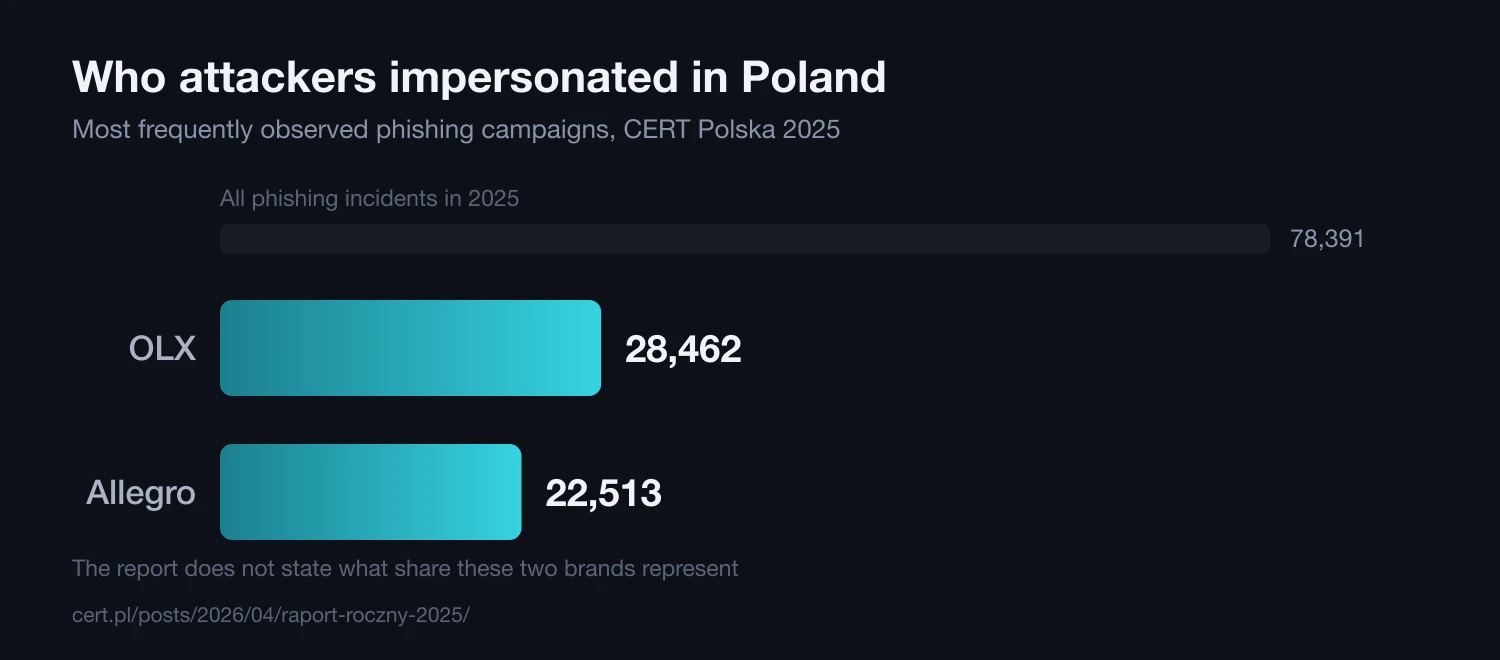
It is also worth knowing who attackers impersonated most often. In 2025 it was two marketplaces: OLX with 28,462 incidents and Allegro with 22,513. The report does not state what share of the 78,391 phishing incidents those two brands account for, so treat them as a direction rather than a percentage. The direction is clear enough: these are the brands people trust enough to click without thinking.
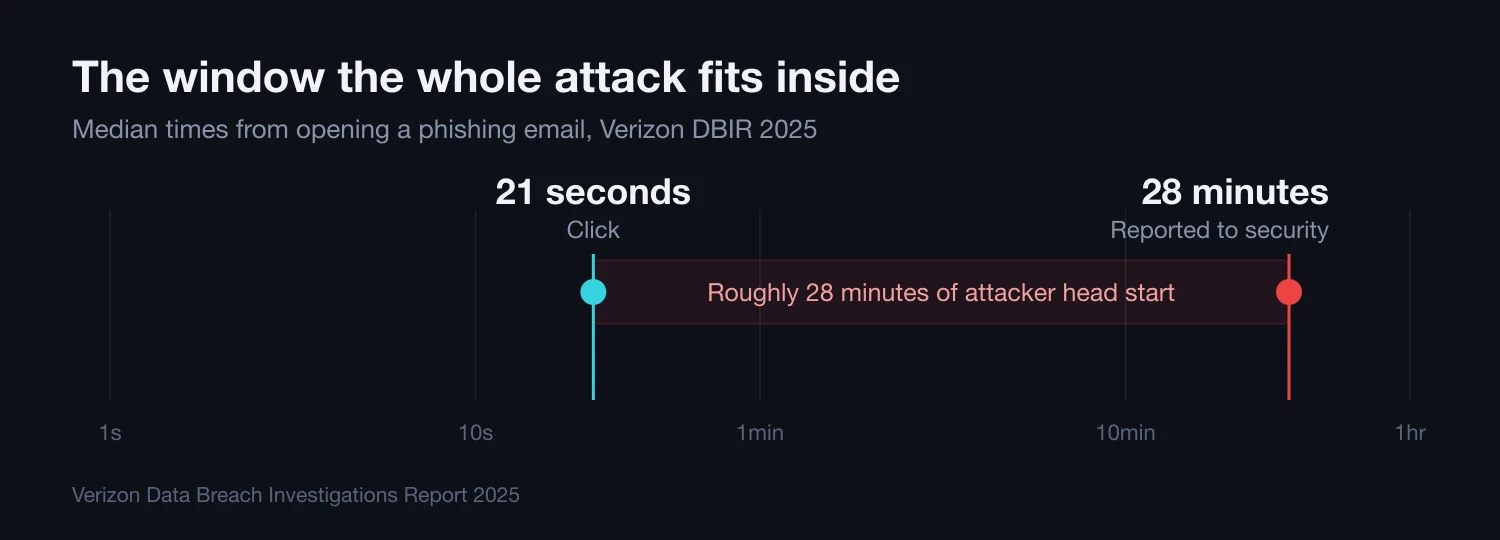
One more number says more than all of those combined. According to the Verizon DBIR 2025, the median time from opening a phishing email to clicking it is 21 seconds. The median time to report it to security is 28 minutes. The entire attack fits inside that gap. Both figures come from the 2025 edition on purpose: the 2026 edition does not restate either median, and we know of no newer measurement on a comparable sample.
Email is no longer the only channel
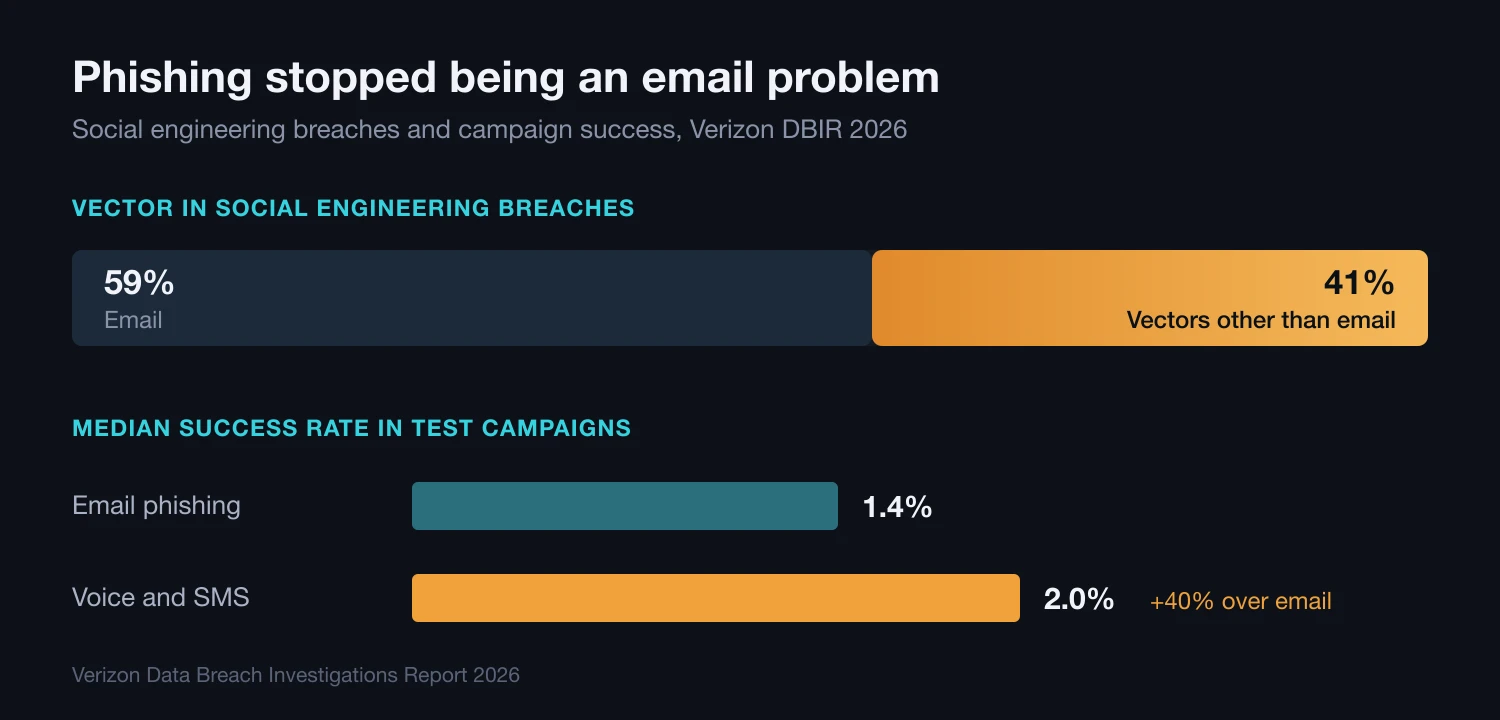
The biggest change of the past year is not the volume of messages but the route they take. In the Verizon DBIR 2026, 41% of social engineering breaches used a vector other than email, and roughly a quarter of all social engineering vectors were phone calls or social media. The human element featured in 62% of breaches, up from 60% the year before.
The non-email channels also work better. The median success rate of test campaigns run over email was 1.4%, against 2.0% for those run by phone and text, a 40% relative difference. That leaves most awareness programmes in an awkward position: an email gateway plus training on how to spot a suspicious email now covers a little over half the problem.
Anatomy of a phishing attack
Reconnaissance
The attacker collects information about the organisation: structure, names, email format, systems in use. Sources are professional networks, the company website, public registries and older breach data. This stage almost never requires a break-in.
Delivering the bait
The victim gets a message matched to their context: an invoice, a request from a manager, a delivery notice. Better reconnaissance makes it harder to tell apart from real correspondence.
Harvesting credentials
The click opens a fake login page or launches an attachment. Modern phishing kits work as a live proxy and capture the one-time code too, so SMS-based two-factor authentication stops protecting anything.
Exploiting access
The compromised account is used to move through the network, pull out data, or send the next round of messages. This time from a real internal address, which more or less guarantees a high hit rate.
Types of phishing
Techniques differ by channel, level of personalisation and chosen target. These are the variants we actually see in the field.
| Variant | Channel | Personalisation | Telltale signal |
|---|---|---|---|
| Mass phishing | Minimal | Generic greeting, big brand | |
| Spear phishing | High | Bypasses the usual procedure | |
| Whaling | Email, voice | Very high | Urgent payment, kept quiet |
| Smishing | SMS | Low | Short link, no headers |
| Vishing | Voice | Medium to high | Time pressure on a live call |
| Quishing | QR code | Low | An image where the link goes |
| Clone phishing | High | A resend with the link swapped | |
| ClickFix | Web page, ad, search result | Minimal | A "fix it yourself" instruction |
| AiTM and consent phishing | Email, chat | Medium | A consent prompt or device code you did not start |
Mass email phishing
One message goes to thousands of recipients, impersonating a bank, a courier or a government body. There is barely any personalisation, but at that scale a fraction of a percent of clicks pays for the campaign. The OLX and Allegro campaigns described above belong here: it is the most common variant and also the easiest to filter.
Spear phishing
An attack aimed at one person, built on reconnaissance. The message references real projects and real colleagues, so the classic warning signs stop working. We go deeper in our guide to spear phishing and whaling, and we test it in practice through phishing tests and social engineering simulations.
Whaling
Spear phishing aimed at the board. The stakes are higher because a CEO or CFO can approve a payment without a second signature. The FBI put losses from BEC attacks at $3.046 billion in 2025 alone, across 24,768 complaints, which works out at roughly $123,000 each (FBI IC3 Internet Crime Report 2025).
Smishing (SMS)
Phishing over text. The short format works for the attacker: no full URL, no headers to inspect, and people read texts on the move. CERT Polska blocked close to 1.88 million malicious texts in 2025. Details in our article on smishing and fake SMS messages.
Vishing (voice)
A phone call where the criminal poses as IT support, a bank or a manager. AI voice cloning means the "CEO" on the line now sounds convincing. We analyse it in our piece on vishing as the number one threat. We test organisations with voice cloning and deepfake video.
Quishing (QR codes)
A link hidden inside a QR code. The email filter sees an image, not a URL, and the user scans with a phone that is usually personal. Detected QR-code attacks rose from 7.6 million in January 2026 to 18.7 million in March, a 146% increase across the quarter, according to the Microsoft Threat Intelligence Q1 2026 email threat analysis. We break the vector down in our quishing guide.
Clone phishing
The attacker copies a real message the victim already received and swaps the link or attachment. Usually there is a pretext bolted on, something like "resending, the previous link expired". The content looks familiar because it genuinely was, so scrutiny drops to almost nothing. This variant shows up most often after someone's mailbox has been taken over, when the attacker can read real correspondence and copy it word for word.
ClickFix
A variant that does not look like phishing at all, because it never asks for a password. A page shows a fake error, an "I am not a robot" check or a set of steps to fix a browser problem, and the user copies the supplied command and runs it on their own machine. The victim is both the target and the delivery mechanism, so there is no link to block and no attachment to scan. The volume moves in jumps: after falling in January and February 2026, CAPTCHA-gated phishing rose 125% in March to 11.9 million attacks, the highest level in a year, according to Microsoft Threat Intelligence. The Verizon DBIR 2026 puts ClickFix at 2.7% of activity detected at the browser level. What the command usually installs is an infostealer, and we trace where the stolen credentials go next in a separate piece.
AiTM and consent phishing
Less a separate channel than a separate mechanism, and currently the most important one on this list. In the AiTM variant the phishing kit sits in the middle of a real login and captures the session cookie along with the one-time code, which makes the second factor irrelevant: we walk through it in our write-up of a campaign aimed at senior executives. In the consent phishing variant the attacker never needs the password at all, because the ask is to approve an app consent prompt or type a device code into a genuine Microsoft form, which is what the FBI warned about in the OAuth device code campaign. The telltale signal is the same either way: a consent prompt or a code request that nothing you did set in motion.
How to recognise phishing
A single signal rarely means much. Risk climbs when several show up at once:
- Time pressure, usually some version of "your account will be suspended within 24 hours"
- A request for data no institution collects by email: password, full card number, one-time code
- A sender address one character or one suffix away from the official domain
- A link that goes somewhere other than its visible text suggests
- An unusual request from a known person, especially about money or a changed account number
- An unexpected attachment, particularly an archive, a macro-enabled file or HTML
- A channel that does not fit the matter, such as a work request arriving on a personal number
KEY TAKEAWAYS
- 1Defending against one variant does not cover the others, because each uses a different channel
- 2Language errors stopped being a warning sign once attackers started using generative AI
- 341% of social engineering breaches arrive outside email, so a training programme limited to email leaves a gap
- 4Median time to click is 21 seconds and median time to report is 28 minutes, which is the real problem
- 5The newer techniques, ClickFix and consent phishing, never ask for a password, so "do not give out your password" does not cover them
- 6Training alone is not enough, you need regular testing with a measurable result
I clicked a phishing link: what to do
The order matters more than the speed of any individual step, because two of them cancel out the effect of the rest. The sequence below assumes the worst realistic case: credentials entered and an attachment opened.
- Minutes 0–5Whoever clickedDisconnect, and do not tidy up
If an attachment opened or you ran a pasted command, disconnect the device from the network, but do not shut it down and do not delete the message: both are evidence for whoever has to establish the blast radius. Enter no further data, even if the page reports an error and asks you to try again.
- Minutes 0–15Whoever clickedReport it before you are sure
Tell security or your manager straight away, even if you do not know whether the page was fake. The median time to report is 28 minutes and every one of those minutes works for the attacker. Reporting a false alarm costs someone a few minutes; reporting late costs the team a weekend.
- Minutes 15–60IT or securityRotate the password and kill the sessions
Changing the password is not enough: a modern phishing kit captures the session cookie, which keeps working afterwards. Sign out every active session, then review app consents and mail forwarding rules, because a newly added forward is a standard sign of a hijacked mailbox. If a payment was involved, the call to the bank comes before all of this.
- Within 24 hoursSecurityEstablish the reach and report it onward
Check whether the account sent messages to anyone else, because phishing from a real internal address has the highest hit rate of all. Report the page to your national CERT, and in Poland forward malicious texts to 8080. If personal data was exposed, start the regulatory notification process, where the clock runs for 72 hours under the GDPR.
How to protect your organisation
Technology stops most messages but not all of them, and one is enough. So the technical layer and the team's reflexes have to work together.
- Deploy phishing-resistant authentication, meaning hardware keys or passkeys instead of SMS codes
- Configure SPF, DKIM and DMARC to make impersonating your domain harder
- Run regular phishing simulations covering email, SMS and voice, because 41% of social engineering breaches do not arrive by email
- Restrict and monitor commands pasted into a terminal or the Run dialog, which is what ClickFix depends on
- Review which applications hold consents in your identity directory, and switch off device code sign-in if you do not use it
- Require payment and account-number changes to be verified on a different channel than the one the request arrived on
- Give the team a simple way to report suspicious messages, and respond to every report
- Monitor the environment around the clock, for example through SOC-as-a-Service, to catch the fallout of a successful attack
- Rehearse the "someone clicked" scenario, because cutting those 28 minutes buys more than another training session
- Start from the data: our Social Engineering Report 2026 covers the scale and includes a team checklist
Frequently asked questions
What are the most common types of phishing?
Mass email phishing generates the most incidents, simply because it is the cheapest to send. Smishing comes next: CERT Polska blocked around 1.88 million malicious texts in 2025. For businesses, though, the costliest is spear phishing and its board-level variant, whaling, because there a single attack ends in a payment rather than a stolen mailbox password. Two variants are growing fastest: quishing, where QR codes now account for roughly 11% of detected phishing emails, and ClickFix, where detections more than doubled in six months.
What is the difference between phishing and spear phishing?
Scale and preparation. Mass phishing is one message sent to thousands of recipients, counting on a fraction of a percent of clicks. Spear phishing is one message written to one person after days of collecting information about them. That has a concrete consequence for defence: an email filter catches a mass campaign through repetition, and a targeted attack has nothing to repeat, so it gets through. We break the difference down in our guide to spear phishing and whaling.
Does two-factor authentication protect against phishing?
Depends which kind. SMS codes and app-generated one-time passwords do not stop a modern phishing kit, because the kit works as a live proxy: it shows the victim the real login page, captures the code in flight and signs in as them. Hardware keys and passkeys do protect you, because they are bound to the site address and simply will not work on the attacker's domain. If you only make one technical change, make that one.
What should I do if I clicked a phishing link?
Disconnect the device from the network if an attachment opened, report it to security even without being certain, then change the password and sign out every active session, because changing a password does not invalidate a stolen session cookie. If a payment was involved, the call to the bank comes before anything else. The full sequence, with owners and time bands, is set out above in "I clicked a phishing link: what to do".
Does phishing always involve clicking a link?
No, and that is the most important shift of the past two years. In ClickFix the victim pastes and runs a supplied command after a fake error message; in consent phishing they approve an app consent or type a device code into a genuine identity provider form. Neither involves a malicious link or a stolen password. Vishing often ends in nothing but a conversation in which the victim makes the payment themselves. So training that boils down to "do not click and do not give out your password" no longer covers a whole class of attacks.
Conclusion
Phishing will not disappear, because it is not a technical problem. It is a trust problem, and you cannot switch off trust in an organisation that has to function. The sensible goal is not zero clicks. It is a team that spots an attack faster than 28 minutes, and processes that limit the damage from the one click that eventually lands.
Do not ask whether your people will click. Assume they will, and find out what happens next.
Sources
- 1.Raport roczny z działalności CERT Polska w 2025 rokuCERT Polska / NASK · 2026-04 · accessed 2026-08-08Polish figures for reports, incidents, phishing, Warning List domains and blocked text messages.
- 2.2026 Data Breach Investigations ReportVerizon · 2026-05 · accessed 2026-08-08Share of non-email vectors in social engineering breaches, median campaign success rates, ClickFix share.
- 3.2025 Data Breach Investigations ReportVerizon · 2025-04 · accessed 2026-08-08Median time to click and median time to report. The 2026 edition does not restate either, which is why the earlier one is cited.
- 4.Internet Crime Report 2025FBI IC3 · 2026 · accessed 2026-08-08Losses and complaint counts for BEC attacks in 2025.
- 5.Email threat landscape: Q1 2026 trends and insightsMicrosoft Threat Intelligence · 2026-04-30 · accessed 2026-08-09Detection volumes for QR-code and CAPTCHA-gated phishing, January to March 2026, across roughly 8.3 billion email-based threats.
Find out which techniques work on your team
Arsen tests your organisation with every vector described above: email phishing, smishing, quishing and vishing with voice cloning. You get results per department, not a generic report.