Infostealers and Major Events: How the Stolen-Credential Market Works
Every major event triggers the same machine: look-alike domains, poisoned search results and an infostealer that takes session cookies along with passwords. The 2026 World Cup as the documented case study, with data, detection and a runbook.
An infostealer does not need a software flaw. It needs a reason for you to click, and a major event supplies that reason to millions of people in the same week. The Verizon 2026 DBIR shows where the path ends: 73% of ransomware victims had an infostealer infection or a credential leak event in the year before the attack, and for half of them the gap was no more than 95 days. The 2026 World Cup is the example here, not the subject — the same pattern runs on an Olympics, a ticket release, a sales event and every other date everyone has in their calendar.
Why a major event is a template, not an exception
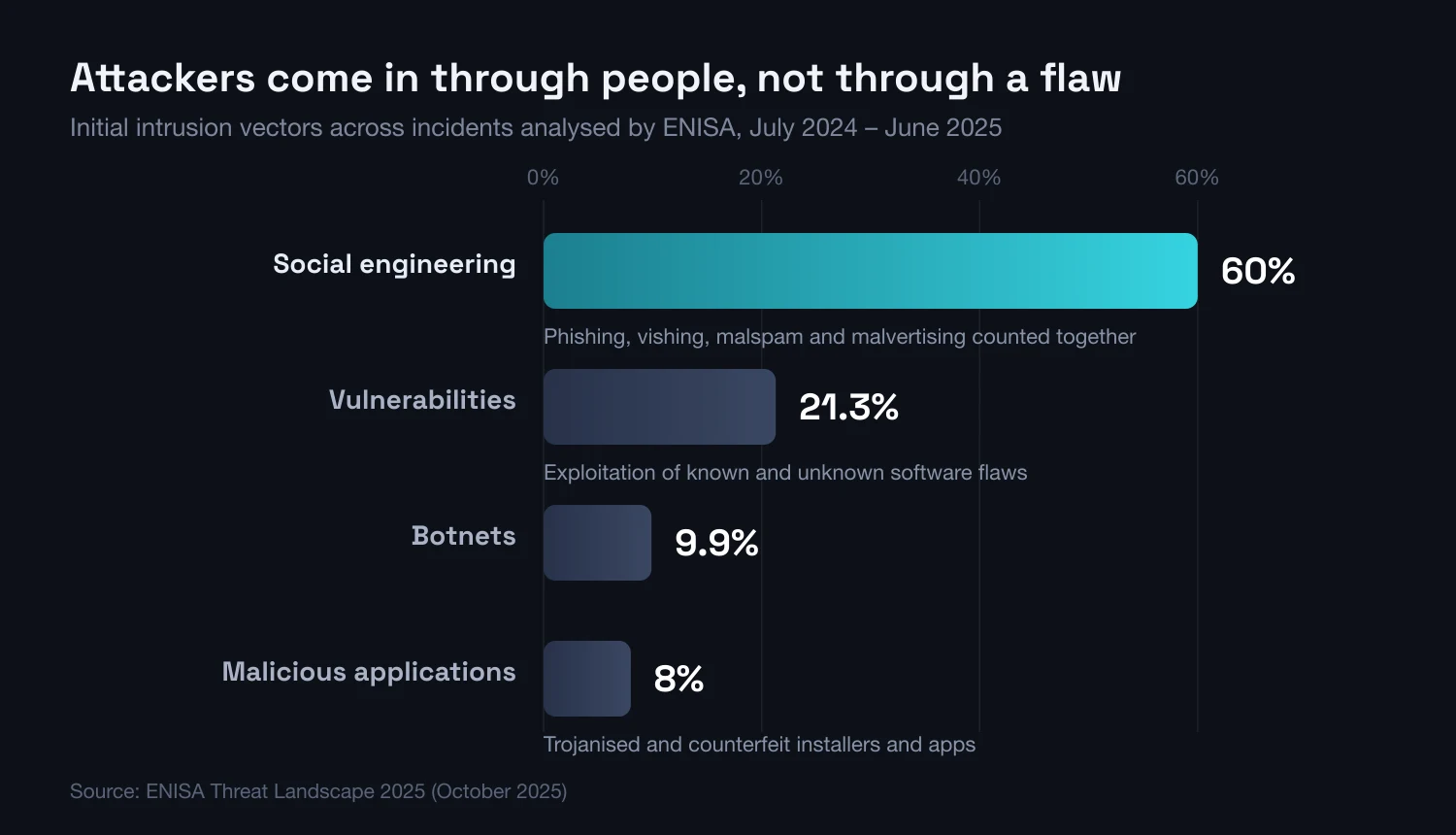
An event does not invent a new attack technique. It creates the one condition an attacker usually lacks: a crowd of people searching for the same thing in the same week, willing to pay, and with a reason to hurry. Everything after that is standard. In its Threat Landscape 2025 report, ENISA attributes roughly 60% of observed initial intrusions to social engineering — phishing, vishing, malspam and malvertising counted together. Exploitation of vulnerabilities accounts for 21.3%. An event does not change those proportions. It increases the number of people the first line will work on.
The infrastructure is built in advance and it can be counted. FortiGuard Labs recorded more than 13,000 new domains referencing the 2026 World Cup registered between January and May 2026, of which 8.8% were classified as malicious or suspicious. The FBI, in its IC3 alert of 27 May 2026, described the same toolkit: spoofed organiser websites, misspellings in the domain name, an alternative extension in place of the original, and paid sponsored results intercepting traffic that was meant for the official site.
The same pattern repeats well outside sport. CERT Polska documented it on the concert-ticket market back in 2024: resale groups on social media, sites imitating a legitimate platform, and a combined variant in which the conversation starts in a messaging app and finishes on a counterfeit payment page. What changes is the name of the event and the keyword set. The mechanics, the channels and the moment of peak effectiveness stay the same.
For a security team the practical conclusion is that the public calendar is a leading indicator. If your organisation employs people who will be buying tickets, booking flights or looking for a stream in a given month, that is the month in which the probability of an infection rises on a device with access to corporate email. Not because anyone is aiming at that particular company.
Anatomy of a campaign around an event
A campaign rarely relies on a single channel. The attacker sets up several entrances leading to the same point: the moment the victim runs a file themselves, or types their details in themselves. The elements below recur across documented campaigns regardless of which event happens to be under way, and each maps onto a technique covered in our guide to the types of phishing.
Poisoned search results and ads that look official
A sponsored result sits above the organic one, and someone hunting for tickets rarely tells the two apart. The FBI explicitly advises against using sponsored results and recommends typing the organiser address by hand or opening it from a bookmark. That is not excessive caution: in the ENISA classification malvertising is counted alongside phishing within those 60% of initial intrusions, and Microsoft names search-result poisoning and malvertising among the main delivery routes for the StealC and Amadey families.
Counterfeit ticketing domains
A domain is cheap and registration is instant, so as many appear as are needed. In its May 2026 alert the FBI listed examples from three families: a misspelling of the brand name, a swap of the domain extension for something other than the original, and names pairing the event brand with the word "tickets", the year, or a host city. Some of these domains sell nothing at all — they exist purely to collect card details and credentials for a ticketing account, which for many people is the same account as their email.
The fake CAPTCHA, or ClickFix
ClickFix inverts the classic pattern: it does not try to download anything on the victim's behalf, it persuades them to paste a command into the system run dialog themselves. The screen poses as a "confirm you are human" check or a browser error notice. ENISA recorded the technique gaining momentum from the first quarter of 2025, most often as a counterfeit CAPTCHA on compromised or purpose-built sites, used to deliver infostealers by drive-by download. For the ClearFake campaign alone, which distributed the Lumma and Vidar families this way, ENISA reports 9,300 confirmed infections.
The counterfeit cloud drive
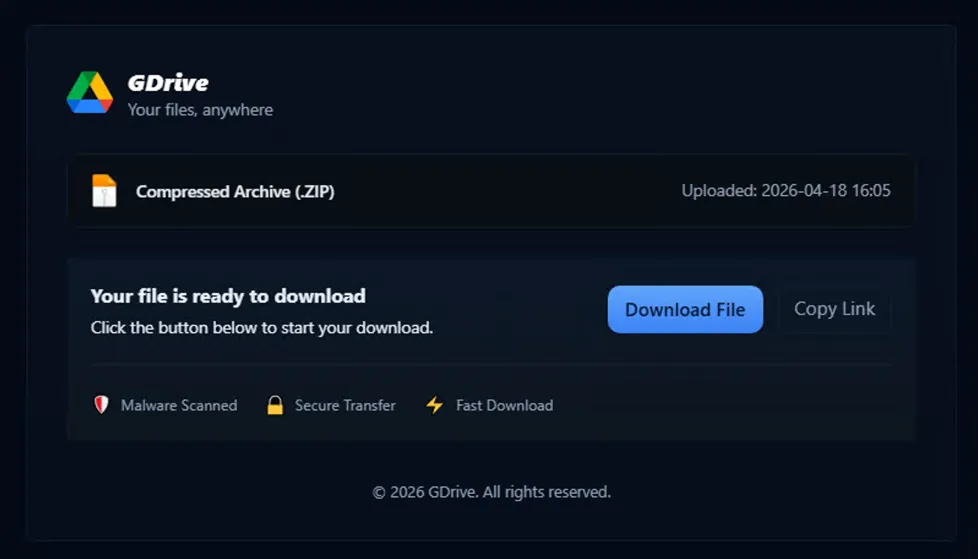
The final redirect in the chain usually lands on a page posing as a familiar file service. In the campaign documented by Flare the page imitated a cloud drive and displayed "malware scanned" and "secure transfer" badges that checked nothing at all. The real download URL was hidden in the page source, and the copy-link button re-triggered the download. Scripts on the page detected open developer tools and wiped the content, and disabled right-click and text selection — obstructing analysis is part of the product here, not an afterthought.
Streams, apps and "free" tools
Anyone who missed out on a ticket goes looking for a stream, and that is the second traffic peak worth monetising. Around a single event, FortiGuard Labs documented fake betting and streaming apps, Android installer files pulled from outside the official store, and more than 1,700 impersonating profiles and channels, roughly 90% of them on the two largest social platforms. On top of that sits a channel with no connection to the event at all, and the most effective one year-round: searching for free or cracked software.
| Lure | Delivery channel | What it takes |
|---|---|---|
| A ticket to the event | Counterfeit domain reached from a sponsored result or a link in a messaging app | Card details, personal data, credentials for the ticketing account |
| A match stream | Fake streaming service, installer file from outside the official store | Credentials, mobile app tokens, access to the device |
| Free or cracked software | Poisoned search results, crack sites, video tutorials | The whole log: browser passwords, session cookies, wallets, autofill |
| A "confirm you are human" check | Counterfeit CAPTCHA on a compromised page (ClickFix) | Whatever the pasted command fetches — usually an infostealer |
| A file shared from the cloud | Download page imitating a file storage service | A loader, then a stealer; live browser sessions |
| Event work or accreditation | Fake recruitment, calendar invite, counterfeit sign-in page | Corporate credentials, one-time codes, single sign-on tokens |
| Merchandise and collectibles | Ghost storefront, social media profile | Card details and personal data |
The infection chain, step by step
The sequence below comes from one documented infection described by Flare and is representative of the whole class. Note that it contains no exploitation of any vulnerability. Every step is either a user decision or standard operating system behaviour.
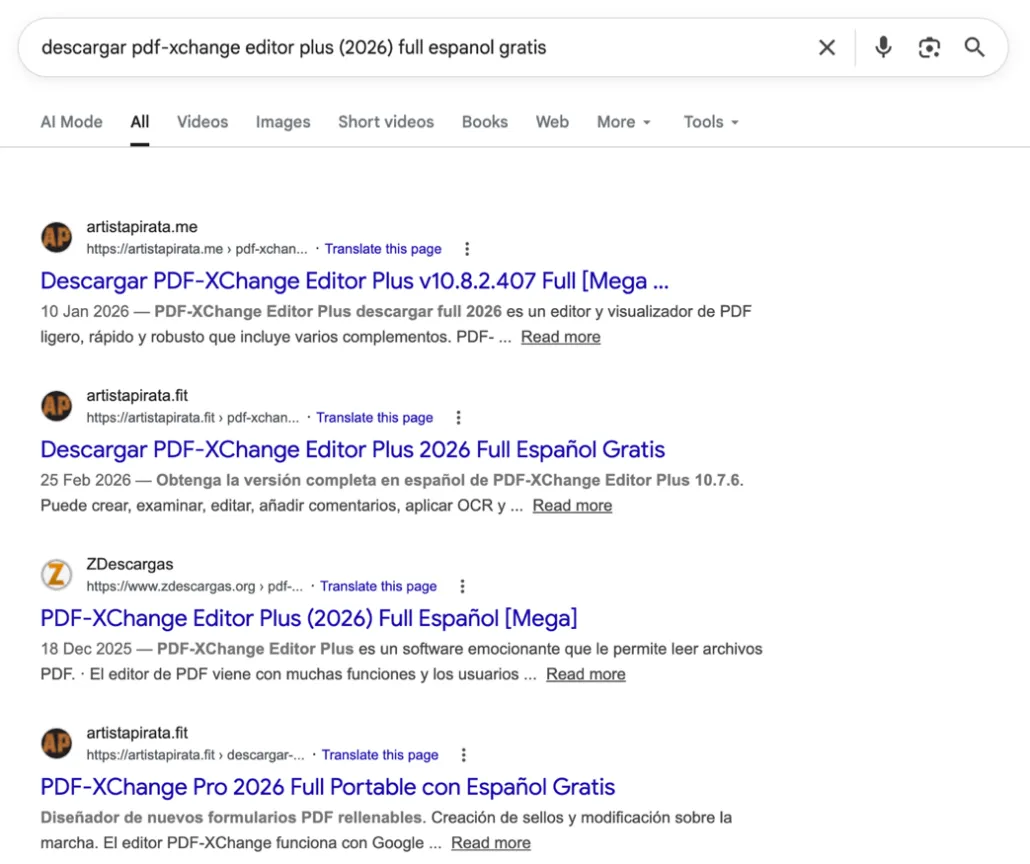
The search — top results lead to piracy
The victim was looking for a free version of a paid PDF editor. Every one of the first results pointed to a site offering cracked software. The decision to look for a pirated copy is the entire attack surface here — no exploit and no zero-day are required, just a trojanised installer and a user who runs it.
The redirect chain — disposable domains
Clicking "download" fired redirects through a public intermediary service and freshly registered disposable domains that generate a new random subdomain per request. The cycle renews itself: ads point to configurable links, newly registered domains replace the flagged ones, and the next victims click. One of the domains in this chain had already been flagged as malicious, with phishing ties.
The fake download page
The final redirect rendered a page imitating a cloud storage service, complete with trust signals that verify nothing. The real file URL was hidden in the page source, and anti-analysis scripts reacted to developer tools being opened. By this stage the victim is already convinced they are downloading a file from a legitimate source.
The payload — a loader and DLL side-loading
The downloaded archive carried a loader chain known under three trade names. A legitimate, code-signed executable from a popular application was renamed and placed beside a trojanised DLL; running that file made the operating system load the malicious library through search-order hijacking. The loader read an encrypted payload from a file disguised as a configuration, decrypted it in memory and executed it reflectively, never writing the decrypted stage to disk. The final payload was most likely an infostealer from the Lumma family.
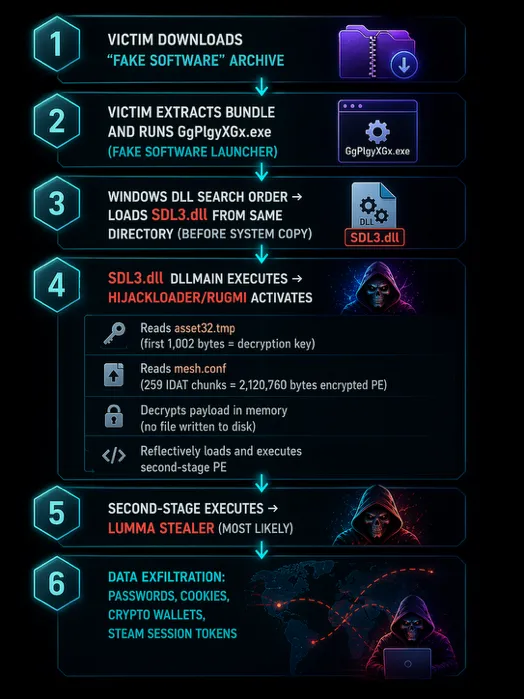
The same loader was one of seven families neutralised in the May 2025 phase of Operation Endgame, and a year later, in June 2026, the same operation hit the infrastructure behind the StealC, Amadey and SocGholish families: 326 servers, 142 domains and close to 27 million recovered credentials. Takedowns work, but the market rebuilds — after each of those operations another family moved into the gap.
What an infostealer actually takes
An infostealer is not hunting for one password. It makes a single pass over everything the browser and installed applications hold locally, packs it into a structured file known as a log, and ships it to the operator's server. Microsoft's June 2026 breakdown of the StealC and Amadey families lists a scope that is typical of the whole class:
- Credentials and cookies from browsers — Chrome, Edge, Firefox and derivatives
- Cryptocurrency wallet extensions
- Passwords saved in email clients
- FTP and SFTP client credentials
- Session data from desktop applications, including gaming platforms
- Screenshots and the contents of form autofill
Why a session cookie hurts more than a password
A password can be changed. A session cookie is proof that authentication has already happened — second factor included. An attacker who drops it into their own browser does not log in. They step into a session already in progress. There is no password prompt, no request for a code and no new sign-in notification, because as far as the application is concerned no new sign-in occurred. Microsoft describes this plainly as a route around multi-factor authentication, and singles out VPN and single sign-on tokens harvested from personal devices as the sharpest version of the risk.
That changes what incident response has to do. A password reset does not invalidate a session — until the system cuts active tokens, a stolen cookie keeps working, sometimes for weeks. ENISA lists session hijacking alongside credential theft and access brokering as the three core functions infostealers perform in the criminal supply chain. We take the second-factor bypass apart in more detail in our piece on credential theft aimed at the C-suite.
What happens next: the log market, access brokers, ransomware
A log is rarely used by whoever collected it. It goes to market. ENISA describes infostealers sold on criminal marketplaces as a solid and prevalent link in the cybercrime supply chain, serving three functions at once: credential theft, session hijacking and access brokering. That third function is the one that matters here — an access broker buys logs in bulk, checks which credentials still work, and resells verified entry into a named organisation.
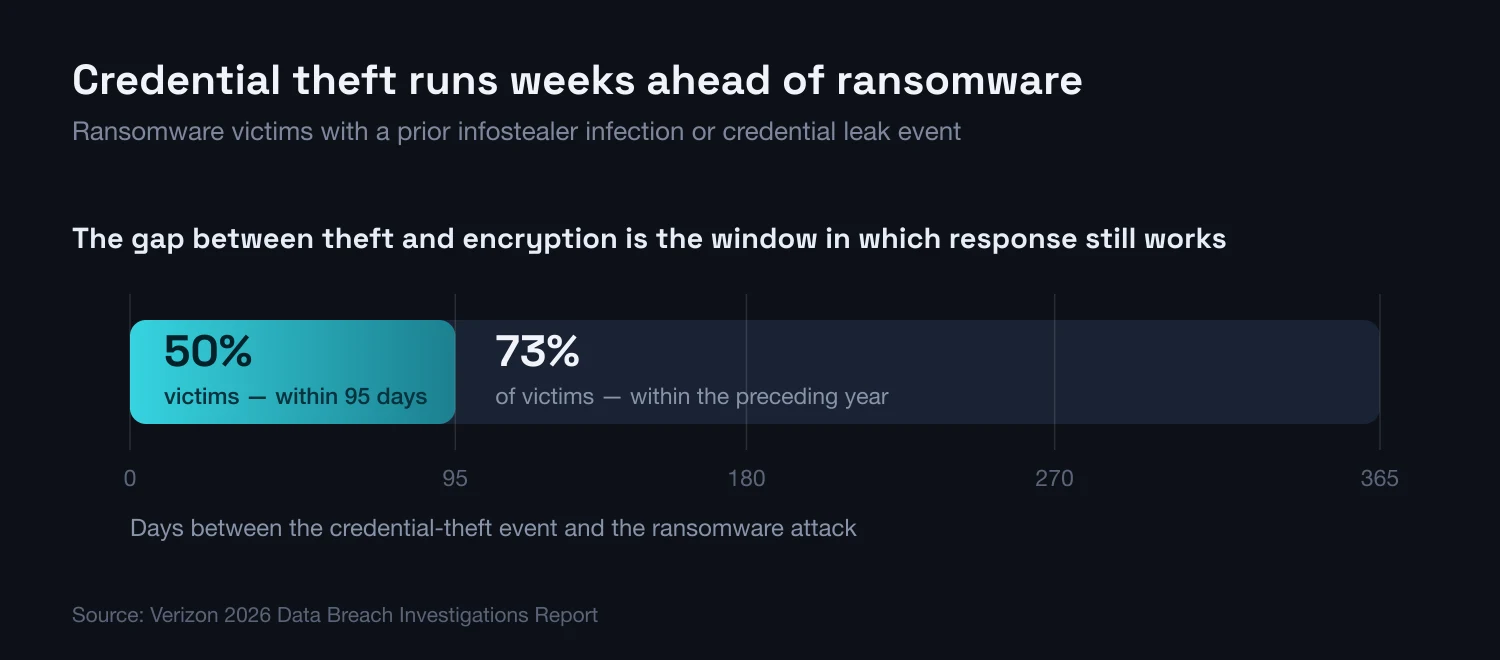
What usually follows is ransomware, and the gap is measurable. The Verizon 2026 DBIR reports that 73% of ransomware victims had an infostealer infection or a credential leak event in the preceding year, and that for half of them the gap was no more than 95 days. The same report shows credential abuse appearing at some point in 39% of all breaches, even though as a pure entry vector it has now been overtaken by vulnerability exploitation.
The practical consequence of those 95 days is that a response window exists, and it is wide. Credentials leak well before encryption lands. Using that window depends on knowing the leak happened at all — and that knowledge will not come from internal systems, because from their point of view nothing occurred. This is why we treat monitoring your own domains across infostealer logs and combolists as a separate control, delivered through exposure and dark web monitoring, rather than as part of endpoint protection.
- The log is bought by an access broker, not by whoever caused the infection — which is why time passes between theft and use
- Credentials are validated automatically, so dead accounts drop out and working ones gain value
- A single log spans corporate and personal accounts from the same device, with no distinction between them
- The same data resurfaces in combolists long after the first sale, so a one-off reset does not close the matter
- Detection on the victim side usually happens only at the consequence stage: an unusual sign-in, a payment or encryption
Personal devices, where corporate risk is actually created
An employee buying tickets on a work laptop over lunch and an employee signing in to corporate email on a home computer are, as far as an infostealer is concerned, doing the same thing. The malware does not distinguish context — it reads the browser credential store in full. If that profile holds a saved sign-in for corporate email, a SaaS console or a VPN, it lands in the same log as the shopping account and the streaming service.
This is where the real organisational problem sits: a personal device is beyond the reach of company policy and yet can be an entry point into the company. Verizon records third-party involvement in breaches rising to 48%, and the usual root causes — absent multi-factor authentication, no credential rotation, excessive privilege — are precisely the ones that make a single stolen log sufficient. The scale is national rather than niche: CERT Polska registered 260,783 unique incidents in 2025, of which 78,391 were classified as phishing, and added 244,341 credential-harvesting domains to its warning list.
- Separate browser profiles — work and personal accounts should not share a password store or a cookie jar
- Do not let the browser save passwords for corporate systems; a password manager with its own unlock is a different class of target
- Provide a no-blame reporting path — an employee who knows they ran the wrong thing needs a reason to say so within minutes, not days
How to detect it in your own estate
Static indicators age in days — redirect domains are disposable and hashes change with every build. What persists is behaviour: a process launched from a user-writable directory, a library loaded beside a renamed code-signed binary, a copy of the browser credential database appearing outside the profile. The queries below are written in KQL for Microsoft Defender XDR advanced hunting and use documented tables and columns only.
// 1. ClickFix: the system shell launches an interpreter that downloads or decodes
DeviceProcessEvents
| where Timestamp > ago(30d)
| where InitiatingProcessFileName in~ ("explorer.exe", "mshta.exe", "wscript.exe", "cscript.exe")
| where FileName in~ ("powershell.exe", "pwsh.exe", "cmd.exe", "mshta.exe", "curl.exe")
| where ProcessCommandLine has_any ("-enc", "-EncodedCommand", "FromBase64String",
                                    "Invoke-Expression", "DownloadString", "iwr ", "irm ",
                                    "-w hidden", "-WindowStyle Hidden")
| project Timestamp, DeviceName, AccountName, FileName, ProcessCommandLine, InitiatingProcessFileName
| order by Timestamp desc

// 2. DLL side-loading: a library from a user directory, rare across the fleet
DeviceImageLoadEvents
| where Timestamp > ago(30d)
| where FolderPath has_any (@"\AppData\Local\Temp", @"\Downloads", @"\AppData\Roaming")
| where FileName endswith ".dll"
| where InitiatingProcessFolderPath has_any (@"\AppData", @"\Downloads", @"\Temp")
| summarize Loads = count(), Devices = dcount(DeviceId),
            Procs = make_set(InitiatingProcessFileName, 10)
        by FileName, FolderPath
| where Devices <= 3
| order by Loads desc

// 3. A copy of a browser credential store created outside the browser profile
DeviceFileEvents
| where Timestamp > ago(30d)
| where ActionType in ("FileCreated", "FileRenamed")
| where FileName in~ ("Login Data", "Cookies", "Local State", "Web Data", "logins.json", "key4.db")
| where not (FolderPath has_any (@"\Google\Chrome\User Data", @"\Microsoft\Edge\User Data",
                                 @"\Mozilla\Firefox\Profiles"))
| project Timestamp, DeviceName, InitiatingProcessFileName, FileName, FolderPath
| order by Timestamp desc

// 4. Traffic to fresh event-themed domains in extensions abused for disposable registrations
DeviceNetworkEvents
| where Timestamp > ago(30d)
| where RemoteUrl has_any ("ticket", "tickets", "final", "hospitality", "stream", "live")
| where RemoteUrl matches regex @"\.(cfd|top|xyz|shop|icu|sbs|cab|click)(/|:|$)"
| summarize Hits = count(), Devices = dcount(DeviceId) by RemoteUrl, InitiatingProcessFileName
| order by Hits descQuery 2 deliberately narrows the result to libraries that are rare across the fleet — without that threshold it returns every legitimate installer. Query 3 catches the step a stealer performs immediately before exfiltration, so a hit there is usually worth an urgent look. Query 4 is not a detection but review material: a visit to a freshly registered domain proves nothing on its own, yet paired with a hit from query 1 or 3 it gives you the order of events.
- Resetting the password and nothing else after an infostealer infection. A stolen session cookie survives a password change — until you revoke active sessions and refresh tokens, the access continues.
- Trusting a result because it "looks official". A sponsored result sits above the organic one and can be bought against any phrase; this is exactly why the FBI recommends typing the address by hand.
- Buying from an ad link or one sent in a messaging app. Even when the destination turns out to be genuine, the habit of clicking links from outside is what event campaigns rely on.
- Treating a personal device as somebody else's problem. A log from a home laptop carries corporate credentials in exactly the same way as a log from a work machine.
- Waiting for an alert from an internal system. Credential theft generates no event on the victim side; the first signal is often the use of the credentials.
- Check whether your domains appear in infostealer logs and combolists — and set this up as a continuous process, not a one-off review
- Enforce phishing-resistant multi-factor authentication where you can, and shorten session token lifetimes
- Make sure you can technically revoke every session for a user in one action, and rehearse it
- Enforce application allow-listing, or at minimum block execution from temporary and download directories
- Turn on detection for the behaviours in the queries above, and check the alerts reach somebody who will act on them
- Remind teams ahead of an event season what the official channel looks like — as a specific domain, not a general principle
- Verify that roles with access to high-value systems have separate administrative accounts and tighter conditional access
KEY TAKEAWAYS
- 1The event is a circumstance, not a threat — the mechanism is identical for a World Cup, an Olympics and a ticket release; only the keywords and the date change
- 2Entry runs through people — ENISA attributes roughly 60% of initial intrusions to social engineering against 21.3% for vulnerability exploitation
- 3A session cookie beats a password — a stolen session bypasses multi-factor authentication, so response must include session revocation, not just a password reset
- 4The response window is wide — for half of ransomware victims the credential-theft event preceded the attack by no more than 95 days
- 5A personal device is a corporate risk — one log spans work and personal accounts from the same browser profile
Runbook: an employee ran an infostealer
The procedure below assumes suspicion, not confirmation. Confirmation usually arrives too late, and most of these steps are reversible, so the cost of running it unnecessarily is low. The order of the first two steps matters, and it is the one most often got backwards.
- Minutes 0–30Helpdesk or SOCCut the device off, but do not power it down
Network isolation through the endpoint protection agent, or physical disconnection. Do not shut the system down and do not delete files — part of the loader exists only in memory, and powering off erases it along with the evidence. Capture a memory image if you have the capability.
- Hours 0–2Identity teamRevoke sessions first, change passwords second
The order matters. Force a global sign-out and revoke refresh tokens for every account used on that device first, then change the passwords. The reverse order leaves the attacker in a live session where the new password blocks nothing. Remove any unrecognised registered multi-factor methods and check whether new ones were added.
- Hours 2–8SOCEstablish the scope of the log
Answer one question: what did that browser have saved. Go through browser profiles, password stores, email and FTP clients, and desktop applications with a persisted session. Treat every account on that list as compromised whether or not you can see it being used.
- Hours 8–48SOC and ITHunt for signs of use
Check sign-ins from unusual locations and devices, new mail forwarding rules, new application integrations, changes to billing details and data exports. These are the standard first moves after an account takeover, usually made before anyone realises an infection occurred.
- Days 2–14CISO or risk ownerRebuild the device and close the loop
Reimage the system rather than cleaning it. Turn on exposure monitoring for corporate domains so you catch the same log the second time it reaches the market. Write down how the infection arrived, and check whether that route is still open to everyone else — it usually is.
Frequently asked questions
What is an infostealer, and how does it differ from an ordinary virus?
An infostealer is malware with one job: collect everything that could be used to log in somewhere, and send it to its operator. It does not encrypt files and does not try to stay on the device permanently — it often terminates after a single pass. The output is a structured file called a log, containing browser passwords, session cookies, autofill data and application tokens, which then goes to the criminal market.
Does multi-factor authentication protect against an infostealer?
It protects against use of the password alone, but not against use of a stolen session. A session cookie is proof that authentication including the second factor has already happened, so replaying it in the attacker's browser triggers no fresh request for a code. Microsoft describes session cookie theft plainly as a route around multi-factor authentication. Phishing-resistant methods and shorter token lifetimes reduce the risk but do not remove it.
How would I know my company's data is in an infostealer log?
Internal systems generally cannot tell you, because from their point of view nothing happened — there was no failed sign-in and no alert. The only practical route is monitoring your own domains across infostealer log collections, combolists and the channels where this data is traded. It is a separate control, independent of endpoint protection.
Is a password reset enough after an infostealer infection?
No. Changing a password does not invalidate active sessions, and sessions are the most valuable part of the log. The correct order is a global sign-out and revocation of refresh tokens first, then password changes, then a review of registered authentication methods and mailbox rules.
Does this only apply to major sporting events?
No. The event is only a circumstance that raises the number of susceptible people at the same moment. The same mechanism runs on ticket releases, sales events, tax filing season and any date that produces predictable search traffic. The most effective channel of all — searching for free or cracked software — works regardless of the calendar.
Is an employee's personal computer a company problem?
Yes, if they sign in to company systems from it. An infostealer reads the browser credential store in full and does not distinguish work accounts from personal ones. A single log from a home device can carry a complete set of details for corporate email, a SaaS console and a VPN, and the company has no visibility on that device at all.
How do I recognise a fake ticket-sales site?
The most reliable method is not to inspect the site but to avoid reaching it from a link — type the organiser address by hand or open it from a bookmark. The FBI additionally recommends avoiding sponsored results and checking the domain extension and the spelling of the brand name. Transaction-side signals are a single permitted payment method, a transfer to a private individual's account, a ticket sent as a file in a messaging app, and time pressure.
An employee bought a ticket on a work laptop from a suspicious site. What now?
Treat it as suspected infection rather than a financial incident. Cut the device off the network without powering it down, revoke sessions and tokens for every account used on that machine, and only then change passwords. Then check whether unusual sign-ins, new mail forwarding rules or new authentication methods have appeared in the last few days.
In summary
The 2026 World Cup gave this phenomenon visibility and countable data: more than 13,000 event-themed domains in five months, an FBI alert, thousands of organiser-linked addresses sitting in infostealer logs. It did not invent a single new technique. The entire mechanism — poisoned search results, counterfeit domains, ClickFix, a fake download page, a log, an access broker, ransomware — worked before this event and will work after it, around the next date in the calendar. Which is why defence cannot be seasonal. The controls that hold are the durable ones: separating personal identity from work identity, being able to revoke sessions in one move, detecting behaviour instead of hashes, and knowing on an ongoing basis which of your credentials are already circulating outside the organisation.
Nobody had to attack a specific organisation to obtain its credentials — they fell out of thousands of ordinary infections on personal computers. That is what makes this mechanism dangerous: it runs without intent, all year round, and a major event simply widens its throughput.
Sources
- 1.ENISA Threat Landscape 2025ENISA · 2025-10 · accessed 2026-08-09Annual EU threat review covering July 2024 – June 2025; source for the initial intrusion vectors, the ClickFix technique and the role of infostealers in the criminal supply chain.
- 2.2026 Data Breach Investigations ReportVerizon · 2026-05 · accessed 2026-08-09Annual breach analysis; source for the gap between credential theft and ransomware, and for the share of breaches involving credential abuse.
- 3.Global cyber strike disrupts SocGholish, Amadey, and StealC malware networksEuropol · 2026-06-24 · accessed 2026-08-09Statement on the June phase of Operation Endgame against the SocGholish, Amadey and StealC families; source for the seized infrastructure and recovered credential figures.
- 4.Threat Actors Spoofing FIFA Websites in Advance of the 2026 World Cup (PSA I-052726)FBI Internet Crime Complaint Center (IC3) · 2026-05-27 · accessed 2026-08-09FBI public alert on spoofed organiser websites ahead of an event; source for the description of typosquatting and sponsored-result abuse.
- 5.Cybercriminals Are Targeting the FIFA World Cup 2026FortiGuard Labs · 2026-06-04 · accessed 2026-08-09Analysis of the fraud infrastructure around a single event; source for registered domain counts, the malicious share and impersonating profiles.
- 6.StealC and Amadey: Breaking down infostealers and the cybercrime services that deliver themMicrosoft Threat Intelligence · 2026-06-24 · accessed 2026-08-09Breakdown of the StealC and Amadey families and the services that deliver them; source for the scope of collected data and the description of multi-factor bypass via session cookies.
- 7.From Pirated Software to Full Access to FIFA: Tracing the 2026 World Cup Infostealer PipelineFlare · 2026-04-29 · accessed 2026-08-09Analysis of infostealer logs containing records tied to the organiser's domains, April 2025 – April 2026; source for the documented infection chain.
- 8.Prawie 2 tys. zgłoszeń każdego dnia. Raport CERT Polska za 2025 rokCERT Polska / NASK · 2026 · accessed 2026-08-09Statistics on incidents handled in Poland during 2025, including phishing incident counts and domains added to the warning list.
- 9.Oszustwa biletoweCERT Polska · 2024-07-16 · accessed 2026-08-09Description of ticket fraud mechanisms on the Polish market; basis for the observation that the pattern recurs outside sporting events.
- 10.DeviceImageLoadEvents table in the advanced hunting schemaMicrosoft Learn · accessed 2026-08-09Advanced hunting schema documentation; the basis for the tables and columns used in the queries.
See what of your data is already exposed
We run Flare.io to continuously monitor the dark web for your leaked credentials and infostealer logs — and our SOC analysts triage every hit, so you can reset exposed accounts before attackers weaponise them.