What is VDI and when do virtual desktops make sense?
VDI means virtual desktops that run on the organisation's servers: staff connect from any device and the data stays in the data centre. We explain how VDI works, how it differs from remote desktop, RDP, DaaS and VPN, what it does for security, what it does not solve and when a rollout makes sense.
VDI (Virtual Desktop Infrastructure) is a way of giving staff a desktop, usually Windows, that runs as a virtual machine on a server rather than on the user's own computer. The user connects to it over the network from a laptop, a thin client or a browser, and only the screen image reaches their device. Applications and files stay on the servers. Below we explain how VDI works, how it differs from remote desktop, application publishing, DaaS and VPN, what it does for security, what it does not solve and when a rollout makes sense.
The acronym has other meanings too. A file with the .vdi extension (Virtual Disk Image) is a virtual machine disk image in VirtualBox. VDI 2700 is a German guideline on securing loads on road vehicles. Some universities call their student login portal for virtual desktops “VDI”, which is one particular deployment of this technology. This article is about virtual desktop infrastructure in an organisation.
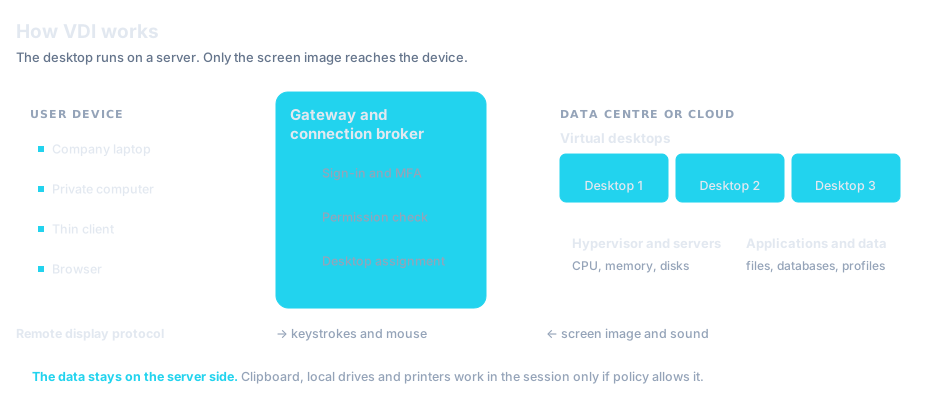
How VDI works
In the usual model the operating system, applications and files sit on the employee's computer. With VDI they sit on servers in a data centre or in the cloud, and the employee's computer displays the image and sends mouse movements and keystrokes. The environment has six parts:
- Servers and a hypervisor. The hypervisor is software that shares the resources of a physical server between many virtual machines. Each virtual desktop is one such machine with its own operating system
- The golden image. A system prepared once, with applications and settings, from which desktops are created. A patch is installed in the image, not on every computer separately
- The connection broker. A service that, after sign-in, checks which desktops and applications the user is entitled to and directs them to a free machine or to their own
- The access gateway. It accepts connections from the internet, encrypts them and passes them to the broker. As a result the desktops themselves are not exposed to the internet
- The remote display protocol. It carries the screen image and sound to the device, and keyboard and mouse input the other way. The best known protocol of this kind is RDP (Remote Desktop Protocol)
- The endpoint. A laptop, a home computer, a tablet, a browser or a thin client
A session follows the order shown in the diagram. The user starts the client program or opens an address in the browser, enters a password and a second factor, and the broker checks their permissions and assigns a desktop. From then on every operation is carried out on the server. After sign-out the desktop is either kept or returned to the state of the golden image, depending on the desktop type, described below.
The VDI terminal, or thin client
A VDI terminal (thin client) is a small device with only as much software as it needs to connect to a virtual desktop. It stores no documents and no applications. A monitor, keyboard and mouse plug into it. Thin clients are used where many people share the same workstations, for example at a clinic reception desk or a customer service point.
Persistent and non-persistent desktops
Virtual desktops come in two types. They differ in maintenance effort, user convenience and security.
A non-persistent desktop has one security advantage: malware that has written itself into the system disappears with the machine at sign-out. What remains is anything that reached the user's profile or network drives, and any passwords the attacker managed to capture.
VDI, remote desktop, application publishing and DaaS
These terms are often used interchangeably, although they mean different things. In everyday speech “remote desktop” is any connection to the screen of another computer. In that sense VDI is one way of getting a remote desktop. The name, however, covers at least three different solutions.
VDI vs RDP and remote desktop
RDP is a protocol, a way of carrying the screen image and commands between two computers. VDI is a whole infrastructure: servers, the golden image, the broker and the gateway. One does not exclude the other, because VDI can use RDP as its display protocol.
The simplest remote desktop is a connection to one particular physical computer, such as a workstation in the office. The second kind is Remote Desktop Services on a server (formerly Terminal Services): many users sign in to one Windows Server system and each has their own session in it. A server that hosts such sessions is called a session host. With VDI each user has a separate virtual machine with its own operating system. They are better isolated from one another, but use more server resources.
VDI vs VM
A VM (virtual machine) is a single computer run in software on a hypervisor. It can be a database server, a test environment or a desktop. VDI is a way of managing many such machines as desktops: creating them from an image, assigning them to users, handling sign-in and connections.
Application publishing and DaaS
With application publishing the user does not get a whole desktop, only the window of one program that runs on a server. On their own computer it appears next to local applications. DaaS (Desktop as a Service) means virtual desktops bought as a service: the provider runs the servers, hypervisor and broker in its cloud, and the organisation manages images, applications and users.
| Model | What the user gets | Where it runs | When it fits | What to watch |
|---|---|---|---|---|
| VDI | Their own virtual machine with a full desktop | On the organisation's servers, on-premises or in the cloud | When applications need a client operating system or users need isolation and their own settings | The highest hardware requirements and the most maintenance work |
| Session hosts (Remote Desktop Services) | A session in a shared server operating system | On the organisation's servers, on-premises or in the cloud | When many people use the same set of applications | Not every application runs correctly on a server operating system with many users at once |
| Application publishing | The window of one application instead of a desktop | On session hosts or VDI machines | When access is needed to one or a few programs, for example for an external firm | Moving files between the application and the device needs clear rules |
| DaaS | A virtual desktop as a service | In the provider's cloud | When the organisation does not want to run its own servers or the number of users changes quickly | Data location, dependence on the provider and latency to systems that stayed on-premises |
These models can be combined in one environment. The choice of model for a given group depends on the applications that group uses.
VDI and VPN for remote work
VPN and VDI solve different problems. A VPN connects the employee's device to the organisation's network. Applications still run on that device, files are downloaded to it, and the computer becomes part of the internal network. If it is infected, the malware usually has the same access to the servers as the user.
With VDI the device does not join the organisation's network. It connects only to the gateway and receives an image. Files stay on the servers unless policy allows them to be copied through the clipboard or local drives.
A VPN is enough when staff have managed company laptops and the applications run locally or in a browser. VDI or application publishing has the advantage when private devices connect, when data must not leave the servers or when access has to be limited to selected programs. Both need multi-factor authentication and both are exposed to the internet, so their gateways should be patched first.
Security: what VDI gives you and what it does not solve
VDI changes where the data sits and where the applications run. That is a benefit in a few specific scenarios. The table lists the figures referred to below.
| Indicator | Value | Source |
|---|---|---|
| Data breaches where the initial access vector was exploitation of vulnerabilities (excluding Error and Misuse breaches) | 31% | Verizon DBIR 2026 |
| Data breaches where the initial access vector was credential abuse (excluding Error and Misuse breaches) | 13% | Verizon DBIR 2026 |
| Data breaches with third-party involvement | 48% | Verizon DBIR 2026 |
| Median time to fully remediate vulnerabilities listed in the CISA KEV catalogue | 43 days | Verizon DBIR 2026 |
| Ransomware incidents recorded by CERT Polska in 2025 | 179 (21 per cent more than in 2024) | CERT Polska / NASK |
The data stays on the servers
If session policy switches off the clipboard and the redirection of local drives and printers, files do not reach the user's device. A lost or stolen laptop then holds no company documents, and access is removed by disabling the account. The same goes for private computers. VDI does not, however, replace disk encryption or removable media control on computers that still store data locally. Those need their own controls, covered in our articles on USB encryption and device control and on DLP systems (both in Polish).
Patches are installed in one place
According to the Verizon 2026 DBIR, exploitation of vulnerabilities was the initial access vector in 31% of breaches, and the median time to fully remediate vulnerabilities listed in the CISA KEV catalogue was 43 days. With non-persistent desktops a patch is installed in the golden image. Once the desktops are recreated every user has it, and there is no waiting for each laptop to connect to the network. Endpoints, servers and the hypervisor still need updating. On Windows, macOS and Linux computers an RMM platform such as NinjaOne installs patches from one console.
Access for external firms
In the same report 48% of breaches involved a third party. A service engineer, an accounting firm or a software supplier often needs one application and gets a VPN into the whole network. Application publishing shows them only that program, through a gateway with MFA, with the rest of the network out of sight. How attackers use supplier access is described in our article on supply chain attacks (in Polish). Administrative access to servers and network devices is a different matter. That is the job of a PAM system such as JumpServer: named accounts for administrators and external firms, a password vault and session recording.
What VDI does not solve
VDI does not protect against account takeover. If an attacker knows the user's password and no second factor stops them, they sign in to the virtual desktop exactly as the employee does and see the same data. According to the Verizon 2026 DBIR, credential abuse was the initial access vector in 13% of breaches. VDI does not remove that vector.
- Malware on a private computer can capture the password typed at sign-in and the image shown on the screen.
- A disabled clipboard does not stop someone photographing the screen with a phone or retyping the data.
- Ransomware started inside a virtual desktop encrypts the network shares the user can write to.
- The gateway and the broker are exposed to the internet. An unpatched vulnerability in them can give an attacker access to every desktop.
- A platform outage stops all users at once, so you need redundant servers and a plan for downtime.
The third of these limits concerns ransomware. In 2025 CERT Polska recorded 179 ransomware incidents, 21 per cent more than in 2024. What to do during such an attack is covered in our article on the first hour of a ransomware attack (in Polish). The limits translate into requirements. Sign-in at the gateway must require multi-factor authentication. A virtual desktop is an ordinary operating system, so it needs EDR-class protection just as a physical computer does (article in Polish). Gateway, broker and session logs should feed into monitoring, so that the person responsible for monitoring notices a sign-in from an unusual place or at an unusual time. Backups of network shares have to be isolated from the network users work in.
VDI, Poland's KSC Act and NIS2
The law does not require VDI. The NIS2 Directive lists access control policies among the minimum risk management measures (Article 21(2)(i)) and, where appropriate, multi-factor or continuous authentication (point (j)). Poland's amended KSC Act requires essential and important entities to run an information security management system (Article 8), which covers access control among other things. A gateway with MFA, access rules for individual applications and session logs help meet those requirements and demonstrate them in an audit. They do not replace risk assessment or the other measures. Who these obligations apply to is covered in our article on NIS2 in Poland.
Pros and cons of VDI
The main advantages and drawbacks of VDI described in this article, in one place.
Advantages of VDI
- Data stays on the servers. With the clipboard and drive redirection switched off, files do not reach the user's device
- Patches go into one image. With non-persistent desktops the update is installed in the master image, not on each computer separately
- Access from any device. From a laptop, a private computer, a tablet, a thin client or a browser
- Access to selected applications only. An external firm sees one program, not the whole network
Disadvantages of VDI
- Dependence on the connection. Without a connection to the server nobody can work, and high latency makes work difficult
- A single point of failure. A platform outage stops all users at once
- Licensing and administration. Virtual environments have their own licensing rules, and someone has to keep the image, gateway and hypervisor patched
- No protection against account takeover. Anyone who knows the password and is not stopped by a second factor sees the same desktop as the employee
Where VDI makes sense
Fewer people work from home in Poland than the EU average, but the share is growing. According to Eurostat, in 2025, 6.1% of employed people aged 15–64 in Poland usually worked from home and 10.2% did so sometimes. A year earlier the figures were 5.5% and 9.8%.
| Indicator | Poland | EU-27 | Source |
|---|---|---|---|
| Usually work from home | 6.1% (2024: 5.5%) | 8.8% | Eurostat, table lfsa_ehomp |
| Sometimes work from home | 10.2% (2024: 9.8%) | 14.2% | Eurostat, table lfsa_ehomp |
| Never work from home | 83.7% (2024: 84.7%) | 77.0% | Eurostat, table lfsa_ehomp |
Remote work is only one of the reasons. VDI or application publishing fits these situations:
- Remote and hybrid work, especially from private computers the organisation does not manage
- External firms and subcontractors who need access to selected applications
- Legacy Windows applications that have to run on Macs, tablets or in a browser
- Call centres and shift teams, where many people use the same workstations and the same set of programs
- Government offices and hospitals, where staff move between workstations and personal or medical data should not remain on local disks
Where VDI does not fit
VDI does not replace computers without extra resources. The computing power, memory and storage have to be provided in the data centre or in the cloud, and the platform has to be maintained. In these situations another solution is usually the better choice:
- A weak or unstable connection. Without a connection to the server the user cannot work at all, and high latency makes work difficult
- Work without network access, for example in the field or while travelling
- Applications that already run in a browser. If all the work happens in SaaS services, a virtual desktop is an extra layer that changes nothing
- Demanding graphics and video. 3D design and video editing need graphics cards in the servers and a good connection, which raises the hardware requirements
- An organisation with no administrator. The platform has to be patched and supervised. Without someone responsible for it, you gain one more unpatched system exposed to the internet
A middle course is to publish only the applications that need it, instead of moving every desktop.
What a VDI rollout needs
A VDI rollout needs decisions in five areas: servers, network, licensing, user profiles and peripherals.
Server sizing
The starting point is the number of people working at the same time, not the number of accounts. For each group you need to establish how much CPU, memory and disk space its applications need. The load is highest in the morning, when many people sign in at once, and during updates and antivirus scans. On top of that comes spare capacity for the failure of one server. The assumptions are best tested in a pilot with real users.
Network and latency
How comfortable the work feels depends more on the latency between the device and the server than on bandwidth alone. Check the links in branch offices and the typical home connections of your staff. Video calls and telephony inside a virtual desktop need separate testing, because sound and camera video are additionally relayed through the server. If the desktops are in the cloud and the databases on-premises, the latency between them matters too.
Licensing
Licensing rules have to be worked out before the model is chosen. Access to Windows virtual desktops and access to session hosts have their own licensing rules, different from those for an operating system installed on a computer. Some software vendors apply separate terms to virtual environments. The VDI platform and the hypervisor need licences as well.
User profiles
With non-persistent desktops, a user's settings, shortcuts, email signatures and files have to be stored outside the machine, in a profile loaded at sign-in. Badly planned profiles make sign-in slow. You need to decide what belongs in the profile, where documents live and how they are backed up.
Printing and peripherals
Printers, scanners, card readers, electronic signature tokens and cameras are connected to the user's device, while the application runs on the server. Every type of device has to be tested. Redirecting printers and drives also makes it possible to copy data out of the session. It should be off by default and switched on only for the groups that need it.
Questions to ask before choosing
It is worth answering these questions before talking about a specific product. We help with that as part of security architecture design, and we carry out the rollout as security systems integration.
- Which applications should be available remotely, and whether a whole desktop is needed or single programs are enough
- How many people work at the same time and from which devices: company, private, thin clients
- What may leave the session (clipboard, files, printouts) and for which groups
- How users sign in, what the second factor is and what happens when a device does not meet security requirements
- Where the desktops should run: in your own data centre, in the cloud or both, and where the data may be processed
- Which licences are needed for the operating system, the applications and the platform
- Who updates the golden image, the gateway and the hypervisor, and how soon after a patch is released
- Where session logs go and who responds to unusual sign-ins
- What users do when the platform is unavailable
What this looks like in Parallels RAS
Parallels RAS publishes Windows applications and full desktops from session hosts, VDI machines and office PCs. Users open them in a browser or in the client on Windows, macOS, Linux, iOS or Android, while the programs run on the organisation's servers: on-premises, in the cloud or both. Connections from the internet go through the Secure Gateway with MFA, and client policies decide whether the clipboard, local drives and printers work in the session. Access rules set, for each application, who can see it: by user or group, IP address, device operating system and whether the device meets security requirements. When replacing a VPN, it is worth moving users group by group so nobody loses access on the day of the switch.
Frequently asked questions
What is VDI in simple terms?
VDI is a computer desktop that runs on the organisation's server. The employee connects to it over the network and sees it on their own screen.
How is VDI different from remote desktop?
“Remote desktop” is a general name for a connection to another computer's screen, and RDP is a protocol that carries such a connection. VDI is an infrastructure in which every user has their own virtual machine, assigned by a connection broker.
Is VDI the same as a .vdi file in VirtualBox?
No. A .vdi file is a virtual machine disk image in VirtualBox, and there the letters stand for Virtual Disk Image. The VDI described in this article is Virtual Desktop Infrastructure, meaning virtual desktops delivered across an organisation.
Does VDI replace a VPN?
Yes, where the user needs access to applications rather than to the whole network. A VPN is enough when staff have managed company laptops and the applications run locally or in a browser.
Is VDI secure?
VDI reduces the risk of data leaking from endpoints and makes patching easier. It does not protect against account takeover, so you still need multi-factor authentication, EDR protection on the virtual desktops, sign-in monitoring and a patched gateway.
What is a VDI terminal?
It is a small device, also called a thin client, whose only job is to connect to a virtual desktop; it stores no applications and no documents.
What is the difference between VDI and DaaS?
With VDI the organisation runs the servers, hypervisor and broker itself. With DaaS the provider runs that infrastructure in its cloud, and the organisation manages images, applications and users.
What are the disadvantages of VDI?
The main drawbacks are dependence on the network connection, a single platform whose outage stops all users, separate licensing rules and the need for an administrator who keeps the image, gateway and hypervisor patched. VDI also does not protect against account takeover.
KEY TAKEAWAYS
- 1VDI means desktops that run as virtual machines on servers, while the user's device receives only the screen image
- 2A persistent desktop keeps the user's changes; a non-persistent one returns to the state of the golden image at sign-out
- 3RDP is a protocol, session hosts share one operating system between many users, and DaaS is virtual desktops as a service
- 4Unlike with a VPN, the user's device does not join the organisation's network and files stay on the servers
- 5A compromised account gives the attacker the same desktop as the employee, so MFA, EDR and monitoring are essential
- 6VDI fits private devices, third-party access and shared shift workstations; it does not fit weak connections, SaaS-only work or an organisation with no administrator
- 7Before choosing full VDI, check whether publishing a few applications would be enough
Sources
- 1.Employed persons working from home by professional status, % of total employment (lfsa_ehomp)Eurostat · 2026-10-30 · accessed 2026-11-11Employed persons (all professional statuses) aged 15–64, 2025. Poland: usually 6.1%, sometimes 10.2%, never 83.7% (2024: 5.5%, 9.8% and 84.7%). EU-27: usually 8.8%, sometimes 14.2%, never 77.0%. Data last updated on 30 October 2026.
- 2.2026 Data Breach Investigations Report: Executive SummaryVerizon · 2026-05 · accessed 2026-11-11Pages 8 and 9: exploitation of vulnerabilities as the initial access vector in 31% of breaches and credential abuse in 13% (non-Error, non-Misuse breaches), median time of 43 days to fully remediate vulnerabilities listed in the CISA KEV catalogue, third-party involvement in 48% of breaches.
- 3.Prawie 2 tys. zgłoszeń każdego dnia. Raport CERT Polska za 2025 rokCERT Polska / NASK · 2026-04-08 · accessed 2026-11-11The article states that 179 ransomware incidents were recorded in 2025, 21 per cent more than in 2024. Text in Polish.
- 4.Dyrektywa Parlamentu Europejskiego i Rady (UE) 2022/2555 (NIS2)Dziennik Urzędowy UE · 2022-12-27 · accessed 2026-11-11Article 21(2)(i) (access control policies) and (j) (multi-factor or continuous authentication, where appropriate).
- 5.Ustawa z dnia 23 stycznia 2026 r. o zmianie ustawy o krajowym systemie cyberbezpieczeństwa oraz niektórych innych ustaw (Dz.U. 2026 poz. 252)Sejm RP (ELI) · 2026-03-02 · accessed 2026-11-11Article 8 of the KSC Act as amended (information security management system in essential and important entities). Text in Polish.
Want to publish applications without a VPN into the whole network?
We deploy Parallels RAS: Windows applications and desktops on any device, including the browser, through a gateway with MFA. The programs and the data stay on your servers.