What is SOAR? How it automates incident response
SOAR is software that carries out defined steps once an alert exists: it gathers context, opens a ticket and triggers the response in other systems. We explain how a playbook works, how SOAR differs from SIEM, XDR and EDR, what to automate first and what to leave alone, and who needs it.
SOAR (Security Orchestration, Automation and Response) is software that connects an organisation's security tools and, once an alert has been raised, carries out steps defined in advance: it gathers information about the event, opens a ticket, notifies the right people and triggers the response in other systems, for example by blocking an account. SOAR does not detect anything. It starts work when an alert already exists. Below we explain what the three parts of the name mean, how a playbook runs step by step, how SOAR differs from SIEM, XDR and EDR, what to automate first and what not to automate, who needs such a system and how a rollout goes.
What SOAR stands for
The acronym stands for Security Orchestration, Automation and Response, and that is how it appears in the glossary of NIST, the US standards institute. The April 2025 revision of NIST SP 800-61 names SOAR alongside SIEM among the tools used to analyse events and to estimate the scope of an incident. Each of the three parts of the name describes a different function.
Orchestration: connecting the tools
Orchestration means that the SOAR platform is connected to other systems and can pull data from them and send them commands. It usually connects to the SIEM, endpoint protection (EDR), email, the user directory and identity provider, the firewall, address and file reputation services, and the ticketing system. Communication usually runs over APIs. One sequence can therefore pull data from three systems and act in a fourth, and the analyst does not have to sign in to each console separately.
Automation: steps that run without a person
Automation means running steps according to a recorded sequence called a playbook. A playbook sets out what should happen after a given type of alert, in what order and under which conditions. A step can be fully automatic or wait for an analyst to approve it. That choice is made separately for each action.
Response: handling the incident in one place
The third part is case handling. The SOAR platform carries a ticket from alert to closure: it assigns it to a person, records each step with its time and result, keeps the evidence that was collected and lets you generate a report. That record is also needed after the incident, because it shows who took which decision and when.
How a playbook works: a step-by-step example
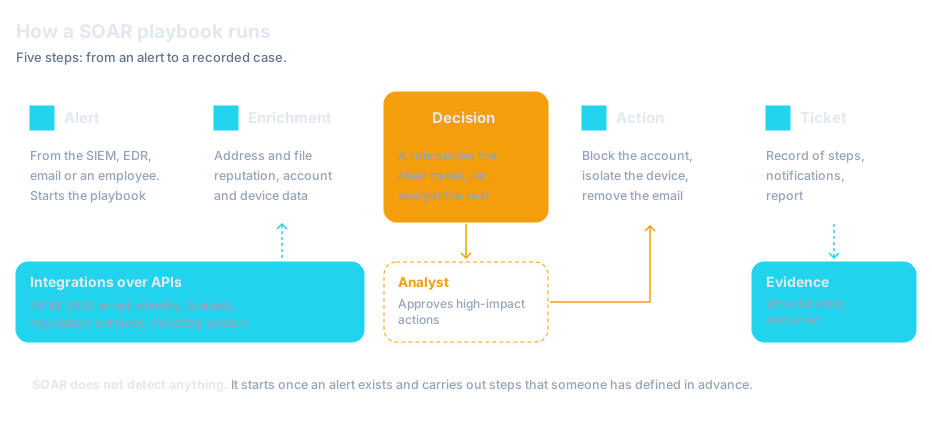
NIST SP 800-61 describes playbooks as actionable steps or tasks for people to perform in various scenarios. SOAR turns that kind of record into a form a program can execute. The example below covers a common scenario: an employee reports a suspicious email. The order of the steps follows the diagram at the top of this article.
- Step 1AutomatedThe alert starts the playbook
A report from an employee or an alert from the email filter reaches the SOAR platform. It recognises the type of event and starts the playbook assigned to it. If a case about the same email is already open, the new alert is attached to it.
- Step 2AutomatedEnrichment
The playbook extracts the sender, links and attachments from the email. It checks them against reputation services, pulls from the mail system the list of people who received the same email, and pulls recipient details from the user directory: department, permissions and recent sign-ins.
- Step 3A rule or an analystDecision
If the link or attachment is listed as malicious by the reputation services, the playbook carries on on its own. If the result is ambiguous, the case goes to an analyst together with the collected data, and the playbook waits for the decision.
- Step 4Automated, some actions after approvalAction
The playbook removes the email from every recipient's mailbox and blocks the sender's address and the domain in the link. If someone clicked the link, it forces a password change and revokes that account's active sessions. Actions with more serious consequences, such as blocking an administrator account, wait for approval.
- Step 5Automated and analystTicket and report
Every step, result and decision is recorded in the ticket. The playbook notifies the person who reported the email and either closes the case or hands it to an analyst for further investigation.
Other playbooks follow the same pattern: a sign-in from an unusual location, a malware alert on a workstation, an employee password found in a leak. The data sources and the actions change, but the order stays the same: alert, enrichment, decision, action, record.
A playbook should also say what happens when something fails: when the system that SOAR sends a command to does not respond, or when an analyst does not approve an action within the agreed time. Otherwise a case can stop halfway and nobody will notice.
Where SOAR fits alongside SIEM, XDR and EDR
| Tool | What it does | Where its data comes from | How it responds | What it will not do |
|---|---|---|---|---|
| SOAR | Runs playbooks after an alert and manages tickets | Alerts from other tools and data pulled over APIs | Triggers actions in many systems: email, identity, EDR, the firewall | Detects nothing and will not fix a poorly defined process |
| SIEM | Collects, normalises and correlates logs, raises alerts, stores data | Logs from servers, applications, the network, the cloud and security tools | Usually only with an alert and a notification | Usually will not stop an attack on its own |
| XDR | Combines detection across endpoints, email, identity, cloud and network | Its own sensors and connected sources | With built-in actions in the systems where it has its own agents or data sources | Will not cover systems it is not connected to |
| EDR | Watches how processes behave on computers and servers | An agent installed on the device | Stops the process and isolates the device from the network | Cannot see what happens outside the device |
SIEM and SOAR: how they work together
The most common pairing is SIEM and SOAR. A SIEM system detects and creates the alert, and SOAR handles it. The order matters: without a source of reliable alerts, SOAR has nothing to work on. An alert can also come from EDR, XDR or the email filter, so SOAR can work without a SIEM. In May 2025 the US agency CISA and Australia's ACSC, together with partners from other countries, published joint guidance on implementing SIEM and SOAR platforms. One of the three documents deals solely with which logs to collect in a SIEM first.
The categories overlap in places. Many SIEM and XDR platforms now include automation, and an EDR such as SentinelOne stops the process and isolates the device on its own. A separate SOAR platform makes sense when the response has to span tools from several vendors, or when the team needs one place to manage cases. A broader comparison of the four categories is in our article SIEM, SOAR, XDR and EDR: the differences (in Polish), and endpoint protection is covered in What is EDR (in Polish).
The way the alert itself is produced is changing too. In Vega, the agentic SIEM we deploy, every alert is triaged, and incidents reach the team as cases with a verdict, evidence and reasoning. The analyst then receives a case with the context already gathered.
Incident volume and handling time: the numbers
The table brings together figures from reports published in 2025 and 2026 and the deadlines in Poland's KSC Act. The CERT Polska figures describe the volume of reports across the whole country, not the number of alerts in a single organisation. The IBM figures concern data breaches at the organisations covered by its study.
| Figure | What it means | Source |
|---|---|---|
| 658,320 | Reports received by the CERT Polska team in 2025. That is more than 1,800 a day | CERT Polska / NASK, report for 2025 |
| 260,783 | Unique incidents registered on the basis of those reports. That is more than 700 a day | CERT Polska / NASK, report for 2025 |
| 247 days | Average time to identify and contain a data breach, across all industries | IBM, "What is a data breach?" page, figures from the Cost of a Data Breach 2026 report |
| 65 days | How much sooner a breach is identified and contained at organisations that use AI and automation extensively in security operations | IBM, "What is a data breach?" page, figures from the Cost of a Data Breach 2026 report |
| USD 1.93 million | How much lower the average breach cost is with extensive use of AI and automation in security, compared with organisations using none | IBM, Cost of a Data Breach Report 2026 landing page. Scope of the study according to IBM's press release: breaches at 602 organisations between March 2025 and February 2026 |
| 24 h and 72 h | Deadlines for the early warning and for the notification of a significant incident, counted from its detection | Poland's KSC Act, Article 11(1)(4) and (4a) |
The IBM figures concern the use of AI and automation in security operations in a broad sense, not SOAR products alone. They show the direction of the relationship; they do not predict the result in any particular organisation.
What to automate first and what not to automate
Start with tasks that meet three conditions: they recur every day, they always run the same way and they do no harm if the alert turns out to be false. In practice these are steps that gather information rather than change the state of systems.
- Alert enrichment: checking an IP address, domain and file hash against reputation services, pulling user and device details
- Opening and assigning tickets: NIST SP 800-61 recommends considering automatic creation and assignment of tickets for certain types of alerts
- Merging duplicates: many alerts about the same event go into one case
- Notifications: a message to the system owner, the user's manager or the person on call
- Evidence collection: saving logs, process lists and configuration from the moment of the alert, before they are overwritten
Playbooks like these cut the time an analyst spends on a single case and cannot interrupt the business. Only once they run reliably is it worth adding actions that change the state of systems.
Which actions need a human decision
An automated step runs just as fast for a real attack as for a false alert. Actions that can stop the business or have legal consequences should therefore wait for a person to decide. What matters is the consequence of a mistake, not the technical difficulty.
- If a detection rule is sometimes wrong, the automated action will run then as well. Before an action is enabled without approval, check how often that type of alert has turned out to be false, and write down the exceptions: systems and accounts the playbook never blocks on its own.
This approach is consistent with NIST SP 800-61. The document recommends considering automatic containment actions, such as quarantining malware or moving a compromised endpoint to an isolated network. It also recommends allowing incident handlers to select and perform such actions manually, instead of or in addition to the automated ones. The order of actions in the first hour is covered in our article Ransomware attack: what to do in the first hour (in Polish).
Who needs a SOAR system
SOAR makes sense where there is a team that handles alerts every day and more alerts than people have time to investigate. That means above all SOC teams, in-house and external, and larger security departments.
SOC teams
In a SOC the same tasks recur on every shift. With automation, a 3 a.m. alert goes through the same steps as a midday one, and the analyst receives the case with all the data attached. If an organisation has no team of its own, a service fills the same role. With SOC as a Service the playbooks and the rota sit with the provider, and the permissions to carry out actions are agreed during onboarding. Managed detection and response (MDR) works on a similar basis; see What is MDR (in Polish).
Entities covered by Poland's KSC Act
Poland's amended KSC Act, the act on the national cybersecurity system (Journal of Laws 2026, item 252), has been in force since 3 April 2026 and also covers some public entities. An essential or important entity submits an early warning of a significant incident within 24 hours of detecting it, and an incident notification within 72 hours (Article 11(1)(4) and (4a)). Who these obligations apply to is explained in our article on NIS2 and the KSC Act. Financial entities have their own incident reporting deadlines under the DORA regulation, covered in the article on DORA requirements.
The Act does not require anyone to buy a SOAR system. Nor will SOAR submit the notification for the organisation or assess whether an incident is significant. What automation can do is shorten the time needed to assess the incident and decide whether to report it: gather data on the scope of the event, record the time of detection, notify the person authorised to report and prepare the information for the form. This matters because the 24 hours for the early warning also run at night and at weekends. In a local authority, a hospital or a municipal company with a small IT department, that automation usually comes from a SOC service rather than from a system of their own.
When it is too early for SOAR
If an organisation does not yet have endpoint protection on every device, a central store of logs or a person who reads the alerts, SOAR will not improve anything. There are no alerts for it to handle and no process for it to run. The usual order is EDR first, then logs and a SIEM or a SOC service, with automation last.
How a SOAR rollout goes
A SOAR rollout is mostly work on the process and the integrations, and to a lesser extent the installation of a product. The system depends on four conditions the organisation has to provide itself: integrations, reliable alerts, a documented process and an owner for the playbooks. A rollout typically has five stages.
1. An inventory of repetitive tasks
The team lists the types of alerts it handles most often and the steps taken for each. A playbook is a record of what the team already does, so if each analyst handles the same type of alert differently, one procedure has to be agreed first. If the steps cannot be written down, there is nothing to automate yet. From the finished list the team picks a few scenarios to start with, usually phishing and suspicious sign-ins.
2. Integrations
For the chosen scenarios you establish which systems SOAR has to connect to, which permissions it needs and who in the organisation grants them. This is the stage at which you find out which systems have neither an API nor a ready-made connector. Steps that depend on them cannot be automated. The accounts SOAR uses to carry out actions have broad permissions in many systems, so they need the same protection as administrator accounts. We connect tools from different vendors as part of our security systems integration service.
3. Playbooks in observation mode
The first playbooks are run so that they gather data and propose actions but carry out none of them. An analyst compares the proposals with what they would have done by hand. This stage reveals errors in the playbook logic and alerts that need tuning at the source. Automation does not improve the quality of alerts: if most items in the queue are false alerts, the playbooks will process false alerts quickly.
4. Enabling actions
Actions are enabled gradually, starting with those that have the least serious consequences. For each one you record whether it needs approval, who approves it, and which systems and accounts are excluded from the automated response.
5. Measurement, review and an owner
From the start it is worth measuring the time from alert to first response, the time to close a case and the share of cases closed without human involvement. Playbooks go out of date as systems, permissions, the structure of the organisation and attack techniques change. They therefore need an owner: a person responsible for reviewing them after every major change in the environment, for testing them and for deciding which actions may run without approval.
Frequently asked questions
What is SOAR in simple terms?
SOAR is software that connects security tools and carries out defined steps after an alert: it gathers information about the event, opens a ticket, notifies the right people and triggers the response, for example by blocking an account. The acronym stands for Security Orchestration, Automation and Response.
How is SOAR different from SIEM?
A SIEM collects logs, correlates them and raises alerts. SOAR detects nothing: it handles alerts that already exist and carries out the response in other systems. The two tools often work together. More: what SIEM is.
What is a playbook in a SOAR system?
A playbook is a recorded sequence of steps for a given type of alert. It sets out which data to gather, which conditions to check, which actions to take and which of them need an analyst's approval.
Which decisions in SOAR stay with the analyst?
Ambiguous cases and actions with serious consequences: isolating a production server, blocking an administrator or service account, deleting data, assessing whether an incident is significant and reporting it to the CSIRT. The analyst receives the case with the data already collected, and the playbook waits for the decision.
Can SOAR work without a SIEM?
Yes, because an alert can also come from EDR, XDR or the email filter. SOAR does, however, need a source of reliable alerts. Without one it has nothing to work on.
When does an organisation not need a SOAR system?
When it does not yet have endpoint protection on every device, a central store of logs or a person who reads the alerts. Automation will not improve anything at that point. The usual order is EDR first, then logs and a SIEM or a service such as SOC as a Service, with automation last.
Does SOAR help meet the requirements of the KSC Act and NIS2?
Poland's KSC Act does not require a SOAR system. It does require an early warning of a significant incident within 24 hours of detection and a notification within 72 hours. Automation can shorten the preparation of the notification: it gathers data about the event, records the time of detection and notifies the person authorised to report. The decision and the notification itself stay with the organisation.
KEY TAKEAWAYS
- 1SOAR stands for Security Orchestration, Automation and Response: it connects tools, runs playbooks and manages tickets
- 2SOAR works on alerts from the SIEM, EDR, XDR and other sources
- 3A playbook has a fixed pattern: alert, enrichment, decision, action, record
- 4Automate information-gathering steps first, then actions with minor consequences
- 5Isolating production systems, blocking privileged accounts and reporting to the CSIRT need a human decision
- 6The organisation has to provide the integrations, reliable alerts, a documented process and an owner for the playbooks itself
- 7Poland's KSC Act allows 24 hours for the early warning and 72 hours for the notification of a significant incident. Automation helps prepare the data but does not replace the decision
Sources
- 1.NIST SP 800-61 Rev. 3: Incident Response Recommendations and Considerations for Cybersecurity Risk ManagementNIST · 2025-04-03 · accessed 2026-11-11The section on procedures and playbooks, and the table of recommendations: DE.AE-02, DE.AE-03 and DE.AE-04 (SIEM and SOAR as event analysis tools), DE.AE-06 (automatic creation and assignment of tickets), RS.MI-01 (automated and manual containment actions).
- 2.Security orchestration, automation, and response (SOAR), glossary entryNIST CSRC · accessed 2026-11-11SOAR as the abbreviation of "security orchestration, automation, and response".
- 3.Guidance for SIEM and SOAR ImplementationCISA, ASD's ACSC · 2025-05-27 · accessed 2026-11-11Landing page for three joint documents dated 27 May 2025: executive guidance, practitioner guidance and a list of priority logs for SIEM ingestion.
- 4.Prawie 2 tys. zgłoszeń każdego dnia. Raport CERT Polska za 2025 rokCERT Polska / NASK · 2026-04-08 · accessed 2026-11-11658,320 reports and 260,783 unique incidents in 2025, that is more than 1,800 reports and more than 700 incidents a day. Text in Polish.
- 5.Cost of a Data Breach Report 2026IBM · 2026-07 · accessed 2026-11-11Report landing page: average breach cost USD 1.93 million lower with extensive use of AI and automation in security, compared with organisations using none.
- 6.What is a data breach?IBM · accessed 2026-11-11Figures from the Cost of a Data Breach 2026 report: 247 days on average to identify and contain a breach, and 65 days faster with extensive use of AI and automation in security operations.
- 7.IBM Study: One in Four Malicious Breaches are AI-Enabled, Costing Companies $6 Million on AverageIBM Newsroom · 2026-07-29 · accessed 2026-11-11Scope of the study: breaches at 602 organisations worldwide between March 2025 and February 2026.
- 8.Ustawa z dnia 23 stycznia 2026 r. o zmianie ustawy o krajowym systemie cyberbezpieczeństwa oraz niektórych innych ustaw (Dz.U. 2026 poz. 252)Sejm RP (ELI) · 2026-03-02 · accessed 2026-11-11Article 11(1)(4) and (4a): early warning within 24 hours and significant incident notification within 72 hours of detection. The Act entered into force on 3 April 2026. Text in Polish.
Need a team that handles alerts using playbooks?
We run SOC as a Service: analysts handle alerts 24/7/365, hunt for threats and respond to incidents using your tools, with evidence for NIS2 and the Polish KSC Act.