What is SIEM? How a SIEM system works and when you need one
A SIEM system collects logs from across the infrastructure, links them into events and raises alerts. We explain how it works in five stages, what it gives an organisation, which KSC Act and DORA obligations it helps meet, the problems to expect and where to start.
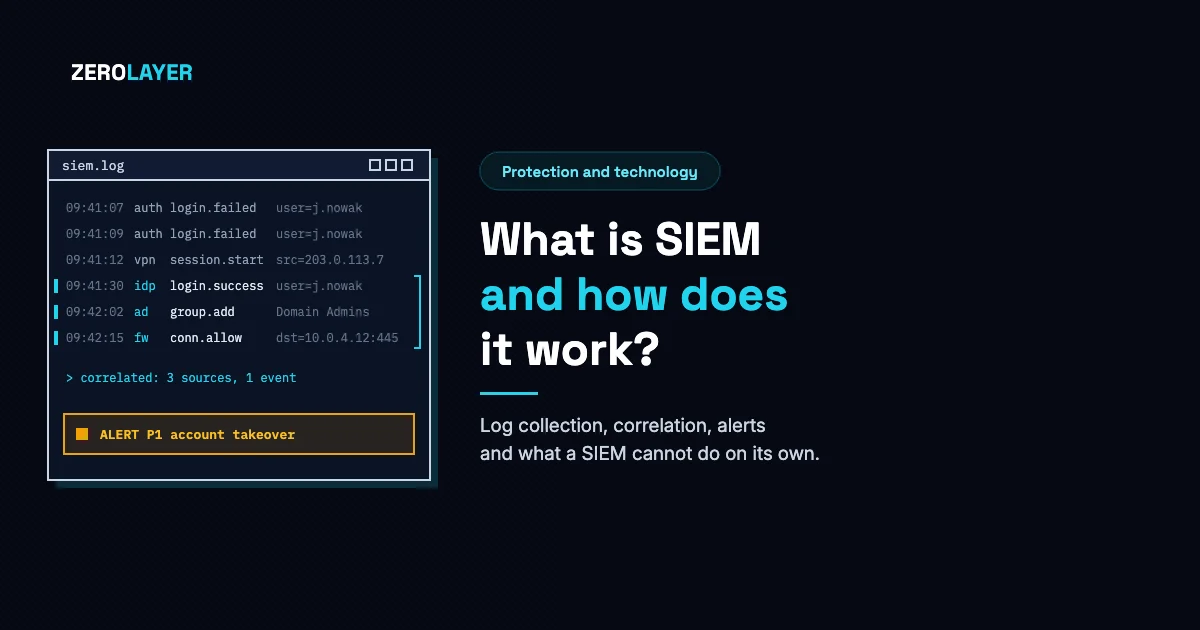
SIEM (Security Information and Event Management) is a system that gathers logs from servers, applications, network devices and security tools in one place, links them together and raises an alert when a pattern of events points to an attack. It also stores that data, so after an incident you can reconstruct what happened and show it to an auditor. Below we explain how a SIEM system works step by step, what it is made of, what it gives an organisation, which problems to expect and where to start. A comparison of SIEM with SOAR, XDR and EDR is in a separate article: SIEM, SOAR, XDR and EDR: the differences (in Polish).
What a SIEM system is
NIST, the US standards institute, describes a SIEM tool as an application that gathers security data from information system components and presents it through a single interface as information you can act on. In practice that means three functions in one product: a central store of logs, a rules engine that searches them for signs of an attack, and a console where an analyst reviews alerts and searches the data.
The name joins two older terms. SIM (Security Information Management) was about storing and analysing logs, mainly for audit. SEM (Security Event Management) was about watching events as they happen and handling incidents. NIST SP 800-92 notes that products used to fall into one group or the other and over time began to do both. Hence the combined name.
Logs are records of events that systems write themselves: a user signing in, a change of permissions, a connection blocked by the firewall, a service starting on a server. Each system writes them in its own format and in its own place. A single entry rarely says anything about an attack. Only when entries from several sources are put side by side do you see, for example, that the same account signed in from two countries within an hour and shortly afterwards gave itself administrator rights.
How SIEM works: five stages
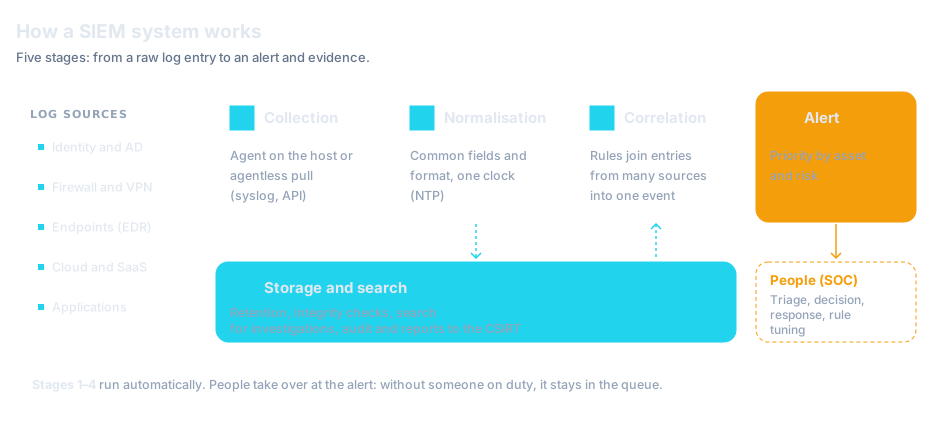
The order follows the diagram at the top of this article. The names of the stages come from the description of log management infrastructure in NIST SP 800-92, published in 2006. NIST is updating this guidance (draft SP 800-92 Rev. 1, 2023), but the stages it describes still apply. Products have changed since then, but every SIEM system still goes through these stages.
1. Log collection
A SIEM gets data in two ways. In the agentless model the SIEM server queries the sources itself, or the sources send it their logs, for example over syslog. In the agent-based model a small program on the server or workstation filters and organises the logs before sending them on. NIST describes this as a trade-off: the agentless model needs nothing installed on each host, but it sends far more data over the network because filtering only happens on the server. Typical sources are the domain controller and identity provider, firewalls and VPN, mail and web servers, endpoint protection, cloud platforms and business applications.
2. Normalisation
Every source records the same information differently. One system writes the time in 12-hour format with a time zone name, another in 24-hour format with the offset in a separate field. That example comes from NIST SP 800-92. Normalisation converts the fields into one form, so that time, IP address, user name and event type mean the same thing whatever the source. Without this step correlation fails, because a rule cannot tell that two entries concern the same account. For the same reason the guidance recommends synchronising the clocks of all systems, for example with NTP.
3. Correlation
Correlation means finding relationships between entries. It is usually rule-based: if one account shows a series of failed sign-ins within a few minutes, then a successful sign-in from a new address and a change of permissions, the SIEM turns those entries into a single event. Rules can combine data from one source or from many, matching on timestamp, IP address or event type. Some systems add statistical methods and profiles of normal behaviour for users and hosts, to catch deviations that no rule describes.
4. Alert and priority
The result of correlation goes into a queue as an alert with a severity rating. A SIEM can raise the priority when the event involves a server holding personal data or a system with a known, unpatched vulnerability. This is where the tool stops and a person takes over: someone has to open the alert, check the context and decide whether it is an incident. SIEM systems usually include case handling, and some can trigger a simple response, such as sending a notification.
5. Storage and search
A SIEM keeps the normalised data for a set period and lets you search it. NIST distinguishes two things here: retention, meaning routine archiving of logs as part of normal operations, and preservation of logs that would normally be discarded but relate to an incident or an investigation. The guidance also recommends integrity checking of the archive, for example with cryptographic hashes of the files, so that you can show nobody changed the records afterwards.
What a SIEM system is made of
Module names differ between products, but the functions are similar. A typical SIEM system has:
- Collectors and agents that receive or pull logs from the sources
- Parsers and a normalisation module that split entries into fields and map them to one schema
- A correlation engine with a library of detection rules, often described in terms of MITRE ATT&CK techniques
- An alert queue and case handling, where an analyst assigns, documents and closes cases
- Dashboards and reports, including reports for audit and regulatory requirements
- A data store with search that keeps logs for the retention period
Some products add user and entity behaviour analytics (UEBA) or response automation. Automation is a separate category of tools, SOAR.
What SIEM gives an organisation
Detecting attacks that no single system can see
It helps most where an attack leaves traces in several places. A compromised account signs in to the VPN, then to cloud email, then to a file server. Each of those systems sees only its own part and none of them has a reason to raise an alarm. A SIEM sees the whole sequence and can join the entries into one case. The same applies to systems where you cannot install an endpoint protection agent: network devices, business applications, SaaS services.
Investigation after an incident
After an incident the first questions are: when did it start, how did the attacker get in, what did they have access to and are they still in the network. The answers are in the logs, provided they were collected, have consistent timestamps and were kept long enough. Without a central store the team has to look for them on each server separately, and some may already have been overwritten.
Evidence for auditors and supervisors
The law does not require you to buy a SIEM by name, but it requires things that are hard to demonstrate without a central store of logs. Among the measures an essential or important entity applies within its information security management system, Poland's amended KSC Act lists covering the information system used to provide the service with continuous monitoring (Article 8(1)(2)(g)). The same Act sets deadlines for reporting a major incident to the sectoral CSIRT, counted from the moment it is detected. Who these obligations apply to is covered in our article on NIS2 and the KSC Act.
To meet the 24-hour deadline for an early warning, you first have to notice the incident and then establish its scope quickly. The final report has to describe what happened and why, and you cannot write that without event records covering the whole period of the attack. The NIS2 Directive lists incident handling among the minimum risk management measures (Article 21(2)(b)) and sets the same three deadlines in Article 23, but counts them from becoming aware of a significant incident.
In the financial sector the requirements are more detailed. Delegated Regulation (EU) 2024/1774, which supplements DORA, requires financial entities to have logging procedures, protocols and tools: they must decide which events are logged and for how long, protect the logs against tampering and unauthorised access, and synchronise system clocks with a reliable time source (Article 12). Article 23 of the same regulation requires a mechanism that collects and analyses those logs, generates alerts about anomalous activity and allows them to be handled within a set time, both during and outside working hours. That is a description of what a SIEM system does and of the people on duty behind it. More on the regulation itself in our article on DORA requirements.
Common problems with SIEM
SIEM has a reputation for being hard to run. Before buying one it is worth knowing three problems you have to plan for in any deployment.
Too many alerts
Rules left at their default settings report anything that might be an attack. A weekly vulnerability scan, a nightly backup or an administrator signing in from home look similar in the logs to an attacker's actions. If nobody tunes the rules, the queue grows and analysts start closing alerts without reading them.
It is normal that most signals turn out not to be incidents. In 2025 CERT Polska received 658,320 reports and classified 260,783 of them as incidents. What matters is whether someone has the time to sort the signals. Tuning rules, giving exceptions an expiry date and regularly reviewing rules that have found nothing for months is ongoing work, not a one-off task during deployment.
Ingesting all the data into one store
A traditional SIEM copies logs into its own store and indexes them there. The volume of data grows with every new source, and so does the load on the system: logs from the cloud, firewalls or web servers can be very large. Organisations therefore cut sources that seem less important, and when an incident happens, exactly that data may be missing. NIST SP 800-92 already noted that normalisation can be very resource-intensive, especially for complex log entries.
Nobody is watching the alerts
The most serious problem is not technical. A SIEM detects and reports, but it does not decide. If a 2 a.m. alert lands in a mailbox that someone reads on Monday, the system meets the requirement on paper and protects nothing in practice. Regulation 2024/1774 puts it plainly: alerts have to be handled within a set time both during and outside working hours.
Who handles SIEM alerts
A SIEM is a tool, and a SOC (Security Operations Center) is the team of analysts and the procedures that use it: they read alerts, decide on the response and tune the rules. Without a team a SIEM produces a queue that nobody closes, and round-the-clock cover needs several people working shifts, so smaller organisations usually rely on SOC as a Service or an MDR service (in Polish). Poland's KSC Act (Article 14) allows both options: internal structures or a contract with a managed cybersecurity service provider. How a SIEM differs from a SOC and how a SOC team works is covered in What is a SOC.
SIEM is also often confused with SOAR. SOAR does not detect anything; it carries out defined steps after an alert, such as blocking an account or opening a ticket. We set out the differences between SIEM, SOAR, XDR and EDR in a separate comparison (in Polish).
| Term | What it is | What it does | What it will not do | When it is enough |
|---|---|---|---|---|
| SIEM | A tool that gathers logs from many systems in one place | Normalises and correlates logs, raises alerts, keeps data for investigation and audit | Does not decide on the response and usually blocks nothing | Not on its own: it needs someone who picks up and investigates alerts at any hour |
| SOC | A team of analysts and its procedures, in-house or as a service | Investigates alerts, decides on the response, tunes the rules | Without a SIEM it cannot see the whole picture and has to go through each system separately | When it has data from tools such as a SIEM and EDR, and its rota covers nights and weekends |
| SOAR | A tool for automating the response | Carries out defined steps after an alert, such as blocking an account or opening a ticket | Does not detect anything | When the process is written down and you can list the steps an analyst repeats every day |
| EDR | A system that runs on computers and servers | Watches how processes behave and can stop an attack on the device by itself | Cannot see what happens outside the device, such as a sign-in to a cloud console or a mail forwarding rule | As the first step, on every workstation and server, with someone picking up the alerts |
The table leaves out XDR, which has its own article: how XDR differs from a SIEM is explained in What is XDR and how it differs from EDR.
A newer approach: querying data where it lives
The problems with ingesting all the data into one store have led to a different model. Instead of copying all logs into one place, the system sends queries directly to where the data already is: an existing SIEM, a data lake, cloud logs or object storage. A new source then needs no migration and no second ingest of the same data.
This is how Vega works, the SIEM platform we deploy. Its Security Analytics Mesh layer queries data at the source, and AI agents run threat hunting, detection, triage and investigation on top of it. Every alert gets a verdict with evidence and reasoning. The way your best analysts work is written down as Detection Skills, so the night shift follows the same steps as the day team.
Vega can run alongside your current SIEM and cover sources it never collected, or gradually replace it. A person approves every proposed change to the rules. The agentic model therefore does not remove the need for someone on duty; it changes the analyst's job from gathering context to making the decision.
Open source or commercial SIEM?
Free and open source SIEM systems exist, and they can collect logs, normalise them and run rules. Getting the software running, however, is a small part of the work. Someone has to install and maintain the servers, write parsers for non-standard sources, keep the rules up to date, watch performance as the data volume grows and pick up the alerts. With a commercial product the vendor takes on part of that work; with open source it stays with the organisation.
Open source makes sense when the organisation has people experienced in running such systems and the time to do it. Without them it is easy to end up with a system that collects data but where nobody develops the rules.
How to start: a checklist
Start a SIEM project with questions, not with a product choice. This list helps you set the scope before talking to a vendor.
- Write down the goals: detecting attacks, evidence for the KSC Act, NIS2 or DORA, investigating incidents. The goal decides which sources and rules come first
- List your log sources and check which of them actually send data today, and in what format
- Start with the sources that matter most: identity and the domain controller, email, VPN and remote access, endpoint protection, the firewall
- Set a retention period for each group of logs and record the reasoning: purpose, legal requirements and the result of the risk assessment
- Synchronise the clocks of all systems with one time source before you start writing rules
- Pick the first rules for the scenarios that threaten you most and plan to tune them in the first few weeks
- Decide who picks up alerts at night and at weekends, who can decide to isolate a system and who signs the report to the CSIRT
- Decide who will maintain parsers and rules for as long as the system is in use
Frequently asked questions
What is SIEM in simple terms?
A SIEM is a system that gathers event records from many systems in an organisation in one place, looks through them for signs of an attack and alerts the security team. It also keeps those records so that an incident can be reconstructed afterwards.
How is SIEM different from EDR?
EDR runs on computers and servers: it watches how processes behave and can stop an attack on the device by itself. A SIEM collects data from many systems, EDR included, and links it together, but it usually does not block anything itself. More in our article on what EDR is and how it works (in Polish).
Does a small business need a SIEM?
Not always. If the business has no servers or domain of its own and nobody who would read alerts, it is better to start with endpoint protection, multi-factor authentication and backups. A SIEM makes sense when the law or customers require monitoring and evidence, or when there are so many systems that reviewing logs by hand is no longer possible. At that point you also need to decide who will handle the alerts.
How long should logs be kept in a SIEM?
Neither NIS2 nor DORA sets a single period for all logs. Delegated Regulation (EU) 2024/1774 requires financial entities to set the retention period themselves, taking into account business and information security objectives, the reason the event is logged and the results of the ICT risk assessment. The period also has to be long enough to reconstruct an incident that is detected late. Record it in a policy together with the reasoning.
Summary
A SIEM system collects logs from across the infrastructure, converts them into a common format, links them into events, raises alerts and keeps the data for investigation and audit. It shows what no single system can see and provides the evidence that the KSC Act and DORA call for. Its value, however, depends on two things outside the product itself: whether it collects the right data, and whether someone picks up the alerts at any hour.
KEY TAKEAWAYS
- 1A SIEM collects logs from many systems, normalises and correlates them, raises alerts and keeps the data for investigations
- 2The name joins two older categories: SIM, storing and analysing logs, and SEM, watching events as they happen
- 3Poland's KSC Act requires continuous monitoring and reporting of a major incident within 24 hours, 72 hours and one month
- 4Regulation 2024/1774 under DORA sets out logging and the detection of anomalous activity, including outside working hours
- 5Common problems are too many alerts, the load of ingesting all the data and nobody reading the alerts
- 6A SIEM is the tool and a SOC is the people: without someone on duty, alerts stay in the queue
- 7Newer platforms such as Vega query data where it lives instead of copying it into one store
Sources
- 1.NIST SP 800-92: Guide to Computer Security Log ManagementNIST · 2006-09 · accessed 2026-11-11Section 3.2 (functions: parsing, filtering, aggregation, normalisation, correlation, retention, integrity checking), section 3.4 (SIEM software, agent-based and agentless collection) and footnote 34 (SIM and SEM).
- 2.NIST SP 800-92 Rev. 1 (Initial Public Draft): Cybersecurity Log Management Planning GuideNIST · 2023-10-11 · accessed 2026-11-17Draft revision of NIST SP 800-92 (Initial Public Draft), published on 11 October 2023.
- 3.Security information and event management (SIEM) tool, glossary entry (source: NIST SP 800-128)NIST CSRC · accessed 2026-11-11Definition of a SIEM tool in the NIST glossary.
- 4.Ustawa z dnia 23 stycznia 2026 r. o zmianie ustawy o krajowym systemie cyberbezpieczeństwa oraz niektórych innych ustaw (Dz.U. 2026 poz. 252)Sejm RP (ELI) · 2026-03-02 · accessed 2026-11-11Article 8(1)(2)(g) (continuous monitoring) and Article 11(1)(4)–(4c) (early warning within 24 hours, notification within 72 hours, final report within one month). Text in Polish.
- 5.Dyrektywa Parlamentu Europejskiego i Rady (UE) 2022/2555 (NIS2)Dziennik Urzędowy UE · 2022-12-27 · accessed 2026-11-11Article 21(2)(b) (incident handling) and Article 23(4) (reporting deadlines counted from becoming aware of a significant incident).
- 6.Rozporządzenie delegowane Komisji (UE) 2024/1774 z dnia 13 marca 2024 r. (RTS do DORA o zarządzaniu ryzykiem ICT)Dziennik Urzędowy UE · 2024-06-25 · accessed 2026-11-11Article 12 (logging, retention period, protection of logs, clock synchronisation) and Article 23 (detection of anomalous activities, handling alerts during and outside working hours).
- 7.Prawie 2 tys. zgłoszeń każdego dnia. Raport CERT Polska za 2025 rokCERT Polska / NASK · 2026-04-08 · accessed 2026-11-11658,320 reports and 260,783 incidents handled by CERT Polska in 2025. Text in Polish.
Need someone to read the alerts?
We run SOC as a Service: 24/7 monitoring of logs and telemetry, alert triage, rule tuning and incident response, with evidence for NIS2 and the Polish KSC Act.